
Seedream 5.0 image editor and generator

Edit a photo with a sentence or create an image from text with ByteDance's Seedream 5.0. Pro for the best detail, Lite when you want it cheap.

Pro from 8 credits, Lite 5 credits. Credits never expire.

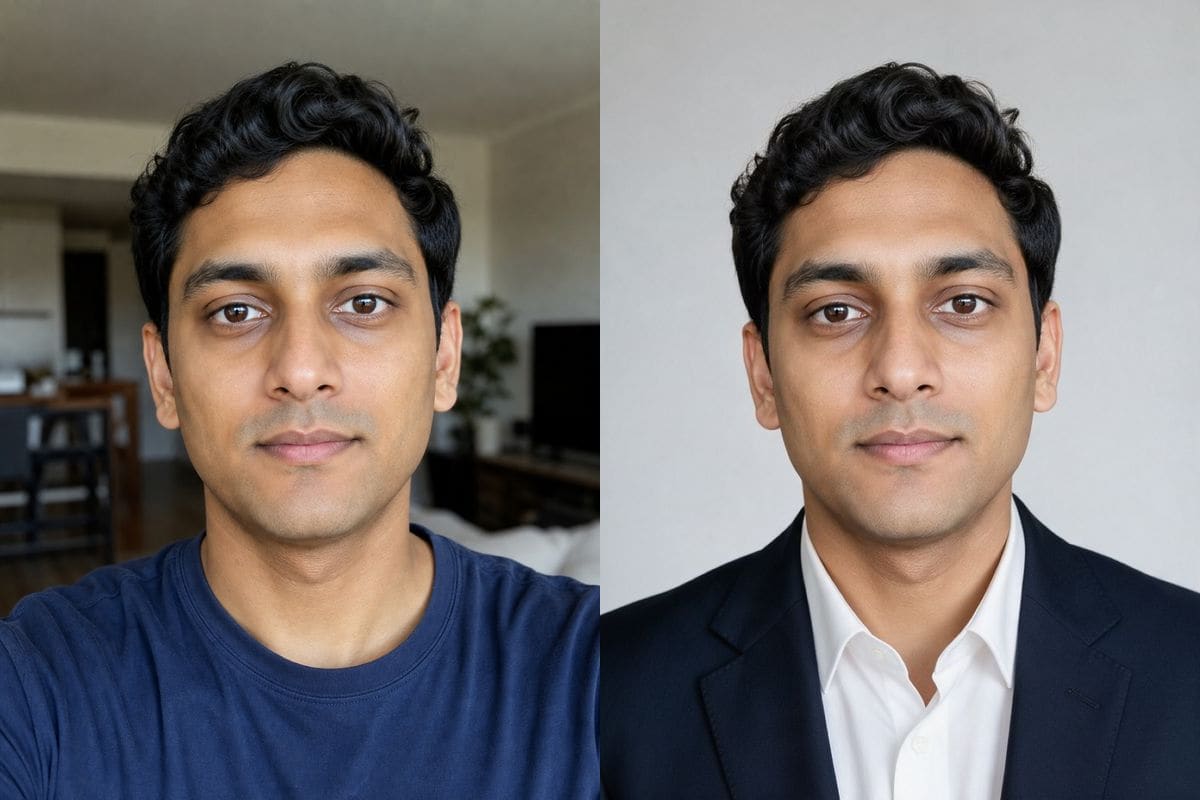
A man in a blue T-shirt next to the Seedream 5.0 Pro result: the same man in a dark navy blazer with a white shirt against a light grey backdropOriginalSeedream 5.0 Pro
No photo? Try one:

Failed generations are refunded.

What Seedream 5.0 did with our test photos

The same three portraits and the same prompts we gave every other model on this site, run on 2 November 2026.

Headshot edit

The closest to the original on a headshot

For the blazer prompt Seedream 5.0 Pro changed the clothes and the room and left almost everything else alone: the face, the hair, the expression and the crop are the same as the selfie. The jacket came out dark navy, close to black, with a plain light grey backdrop. If you want a profile photo that still looks exactly like you, this is the model to try first.

PromptPut him in a navy blue blazer with a white shirt, studio headshot lighting. Keep his face unchanged.
  • Face, hair and framing unchanged
  • 29 seconds on Pro
A man in a blue T-shirt next to the Seedream 5.0 Pro result: the same man in a dark navy blazer with a white shirt against a light grey backdropOriginalSeedream 5.0 Pro
Painting

A watercolor that keeps the room

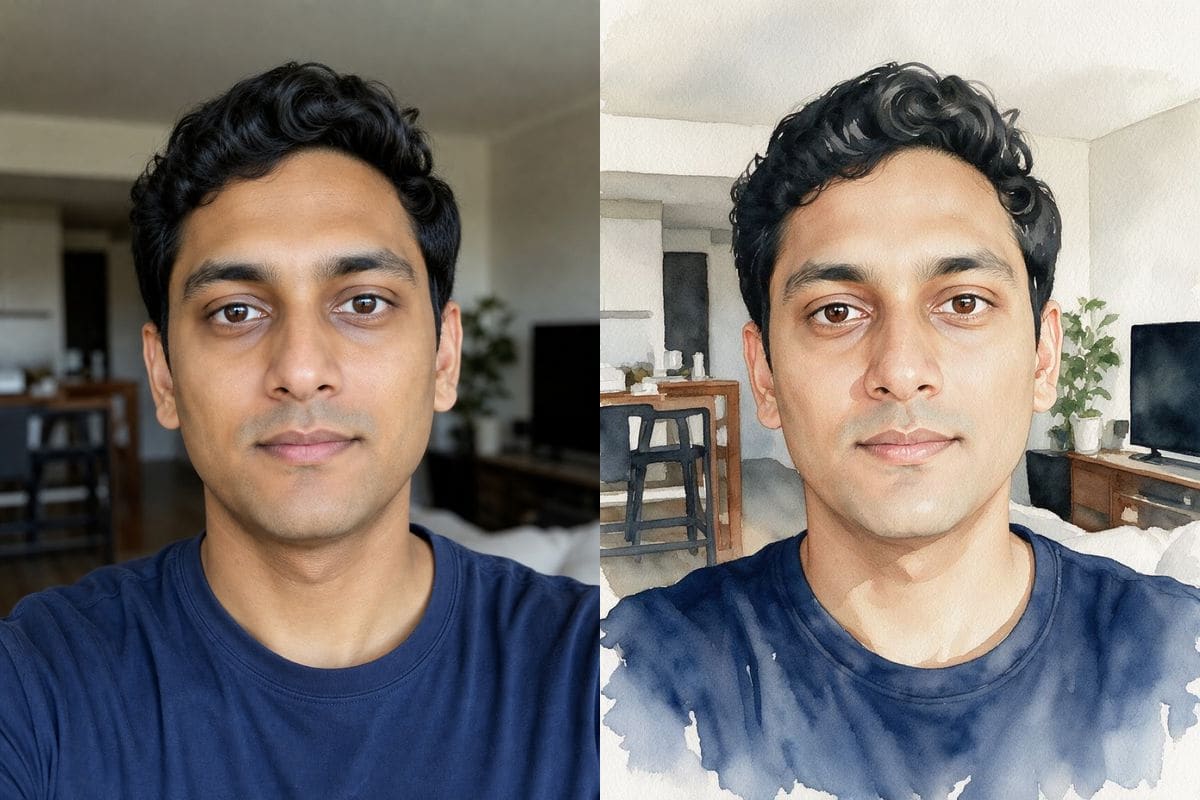
Where the Nano Banana models redraw the scene as a loose painting, Seedream kept the photograph's structure: the shelves, the television, the stools and the plant are all still there, with watercolor texture and washes over them. It looks like a watercolor print of a photograph, which is often what people mean by the request. Pro took 93 seconds on this one, the slowest of our runs.

PromptTurn this photo into a soft watercolor painting with visible brush strokes and paper texture.
  • Scene detail preserved
  • 93 seconds on Pro, 42 on Lite
A man photographed in a living room next to a watercolor version of the same picture made by Seedream 5.0 Pro that keeps the furniture and the roomOriginalSeedream 5.0 Pro
Illustration

A true anime look, at the cost of likeness

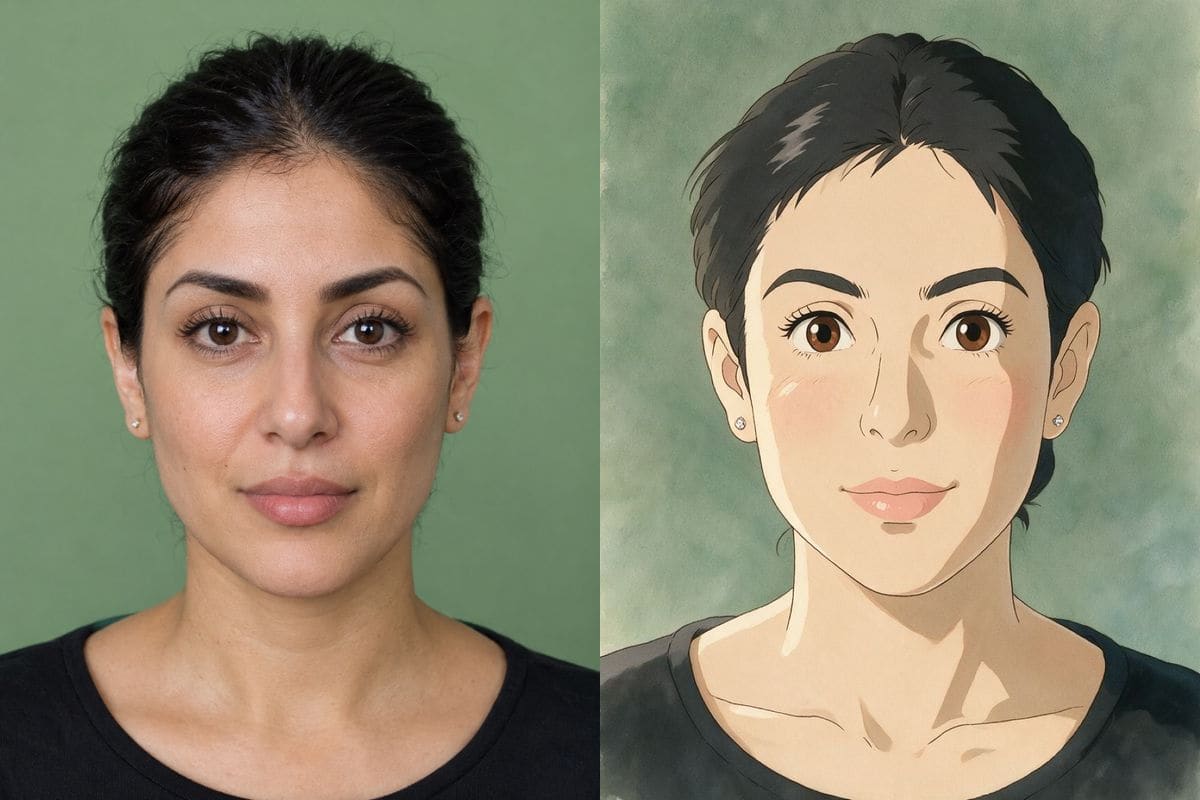
The Studio Ghibli prompt gave a convincing hand-drawn film frame with large eyes, soft blush and a painted background. It also changed the person: the hairstyle became short and fringed and the face reads as a different character. If likeness matters, describe the hairstyle and face shape in the prompt, or use Nano Banana 2.1, which kept the person recognisable in the same test.

PromptRepaint this photo as a hand-painted animated film frame in the Studio Ghibli style, soft painted textures and warm light. Keep the person recognisable.
  • Strong illustration style
  • Hairstyle and face drift
A woman with dark hair on a green wall next to the Seedream 5.0 Pro result: an anime-style drawing of a woman with short fringed hairOriginalSeedream 5.0 Pro
Text to image

A moody pond from Pro, a pink sunrise from Lite

Without a photo, the same paper-boat prompt gave a cool, dim, blue-toned pond on Pro and a pink-orange sunrise with the sun in frame on Lite. Lite costs 5 credits against 8 for Pro, so it is a good way to try ideas before you spend more.

PromptA red paper boat floating on a calm pond at sunrise, soft mist, shallow depth of field, photo
  • Lite shown here
  • Ratios 1:1, 4:3, 3:4, 16:9, 9:16, 2:3, 3:2, 21:9
A small red paper boat on a misty pond with a pink sunrise, made by Seedream 5.0 Lite from a text prompt

Tips for better Seedream 5.0 results

For a headshot, say "keep his face, hair and framing unchanged". Pro nearly did already.

For anime or Studio Ghibli, describe the hairstyle and face shape. The likeness drifted in our test.

On Lite, choose ultra: it costs the same 5 credits as basic. Seedream has no auto ratio, so pick the shape of the picture.

How to use Seedream 5.0

Three steps, no install.

  1. Add a photo, or skip it

    Upload up to 5 photos to edit them with Seedream 5.0, or leave the tray empty to create an image from text.

  2. Say what you want

    Type the change in plain words. Seedream 5.0 is already selected; the credit cost shows next to the button before you start.

  3. Download or keep editing

    The result appears under the tool and stays in My images for 30 days. Download it, or send it back in as the next photo.

Seedream 5.0 compared with the other models

Same prompts, same portraits, measured on 2 November 2026.

ModelCredits at 1KSecondsGood at
Nano Banana 2.1520 to 39Everyday edits; keeps a likeness through a style change
Nano Banana 2819 to 24Speed; 16:9 and 21:9
Nano Banana Pro1030 to 36Faithful faces; 4K
GPT Image 2858 to 65Lettering in a script; bold colour
GPT Image 2.5836 to 64Lettering; nine aspect ratios
Seedream 5.0 Pro8 (12 at high)29 to 93Headshots closest to the original
Seedream 5.0 Lite537 to 48Cheap drafts, any quality
Grok Imagine516 to 29Fast, photographic scenes
Z-Image Turbo113 to 19Cheapest text-to-image drafts (no photos)

Seconds are wall-clock from pressing Generate to the finished image, over one to six runs per model; they vary with load. Credits are what this editor charges.

When to pick Seedream 5.0

Pro costs 8 credits at basic quality and 12 at high; Lite costs 5 at any quality. In our test Pro was the closer to the original on the headshot, while Lite gave brighter colour, a vivid navy jacket on a light backdrop.

Timing differs: Pro took about 30 seconds on three of five runs and 81 and 93 seconds on the two illustration-style runs; Lite took 37 to 48 on all five.

AI Photo Editor pricing

A standard edit costs 5 credits; larger sizes and premium models cost 8 to 15. Buy a pack once and use it whenever you like. Bigger packs bring the price of a standard edit down from $0.27 to $0.19.

Starter

Try it out

$4.99one-time

18images

$0.27 per imageBase price

150 credits

Basic

Around 43 images

$9.99one-time

43images

$0.23 per imageSave 14%

350 credits

Plus

Around 93 images

$19.99one-time

93images

$0.21 per imageSave 20%

750 credits

Studio

For daily creators

$69.99one-time

375images

$0.19 per imageSave 30%

3,000 credits

Image counts and per-image prices here use 8 credits, what Seedream 5.0 Pro costs at basic quality. The cost of the model and size you pick always shows before you start.

Secure one-time checkout through Stripe. Buying a pack only adds credits to your account. USD prices. Review the final amount and any applicable tax at checkout before paying. Credits do not automatically renew, and unused credits can be refunded within 7 days of purchase. The credit cost shows before each image; finished results need no second payment to view or download.

Seedream 5.0 questions

What is Seedream 5.0?

Seedream 5.0 is ByteDance's image model. It creates images from text and edits photos from a written instruction. This editor offers two versions: Pro and Lite.

How much does Seedream 5.0 cost here?

Pro costs 8 credits at basic quality and 12 at high. Lite costs 5 credits at any quality. Credits come in one-time packs from $4.99 and never expire. A failed image costs nothing.

Is Seedream 5.0 free?

No. A new account gets 5 free credits, enough for one image with Seedream 5.0 Lite.

How fast is it?

Between 29 and 93 seconds for Pro and 37 to 48 for Lite in our test of five images each. Pro is the one with the wide range.

Does it keep my face?

On a headshot edit it kept the face almost unchanged. On a heavy style change (Studio Ghibli) it changed the hairstyle and the face, so add details of the person to the prompt.

Which aspect ratios can I use?

1:1, 4:3, 3:4, 16:9, 9:16, 2:3, 3:2 and 21:9. There is no auto, so you pick the shape.

Can I upload more than one photo?

Yes, up to 5 photos per image.

Is this the official Seedream site?

AI Photo Editor is an independent site. It is not affiliated with, endorsed by or sponsored by the company that makes the model; model names belong to their owners.

Try Seedream 5.0 on your own photo

New accounts start with free credits. Failed images cost nothing.