
AI Christmas photo maker

Upload one photo of the people or the pet, pick a Christmas look and get the picture in about 30 seconds. The faces stay the same; the tree, the sweaters, the snow or the hats are added around them.

5 credits a photo. Failed images are free.

Three friends on a sofa in everyday clothes next to the same three in matching red reindeer sweaters in front of a decorated Christmas treeOriginalNano Banana 2.1

Failed generations are refunded.

What each Christmas look does

The four looks in the tool, each run once on a photo that suits it. We show what came back, including what changed that we had not asked for.

By the tree

Matching sweaters and a decorated tree

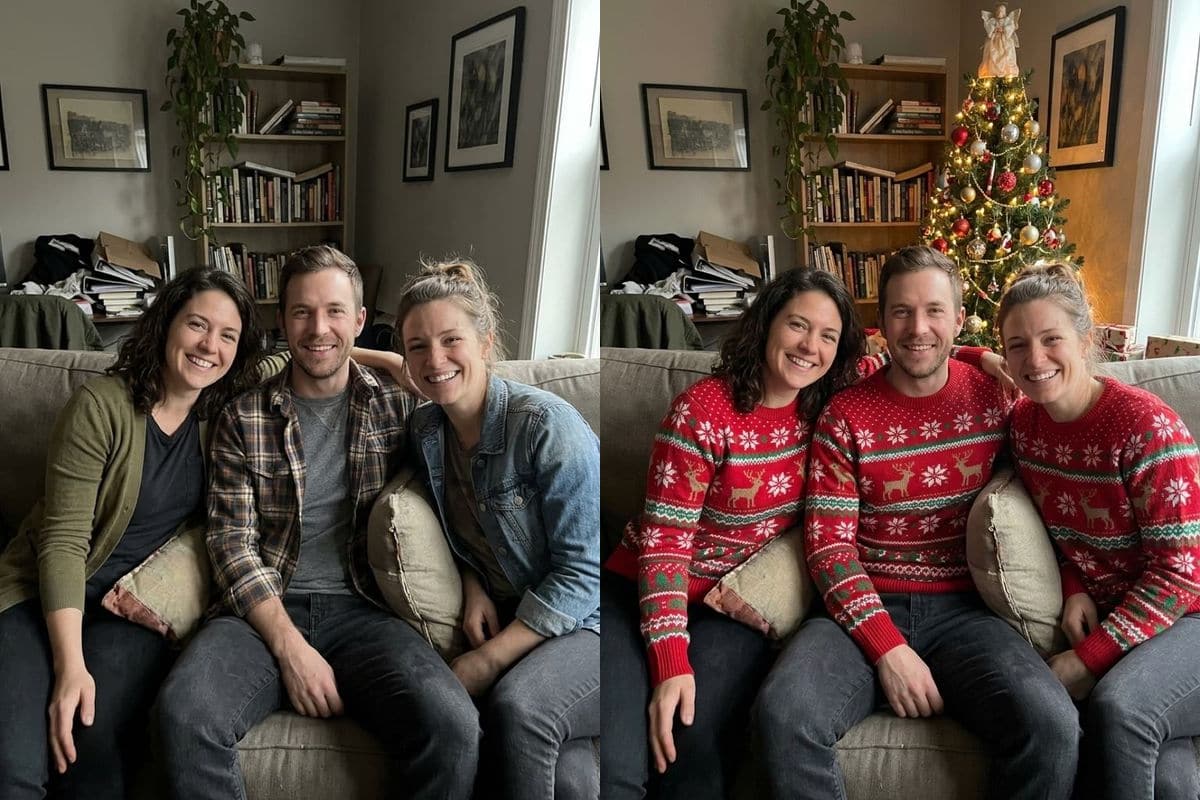
A sofa photo of three friends in everyday clothes came back with a lit Christmas tree behind them and matching red reindeer sweaters on all three, the man's flannel shirt included. The three faces, the way they lean together and the sofa stayed as they were. The tree and the lights are the only things added to the room.

PromptAdd a decorated Christmas tree with warm fairy lights behind them and put them in matching red Christmas sweaters. Keep every face, pose and expression exactly the same.
  • Faces and pose kept
  • Everyone gets the same sweater
Three friends on a sofa in everyday clothes next to the same three in matching red reindeer sweaters in front of a decorated Christmas treeOriginalNano Banana 2.1
A snowy street

A town street at dusk, in winter coats

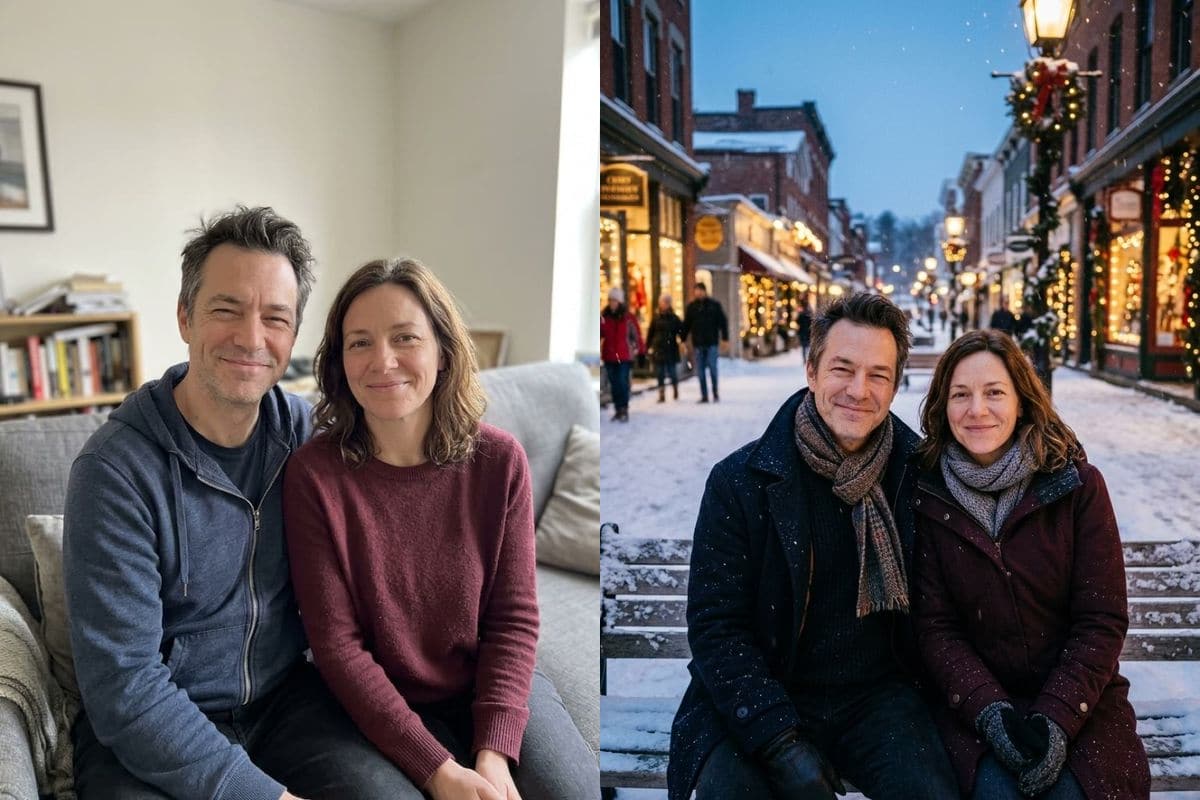
A couple on a sofa were moved onto a snowy town street at dusk, with shop windows hung with lights, falling snow, winter coats and scarves. Their faces and expressions are the same, and the picture is framed a little closer than the original. The room is replaced completely, so this look suits a photo where the background does not matter.

PromptPlace them on a snowy town street at dusk with Christmas lights and gently falling snow, wearing winter coats and scarves. Keep every face, pose and expression exactly the same.
  • The whole background is replaced
  • Framing a little closer
A couple on a sofa next to the same couple in winter coats and scarves on a snowy town street hung with Christmas lightsOriginalNano Banana 2.1
Santa hats

A Santa hat on every person and pet

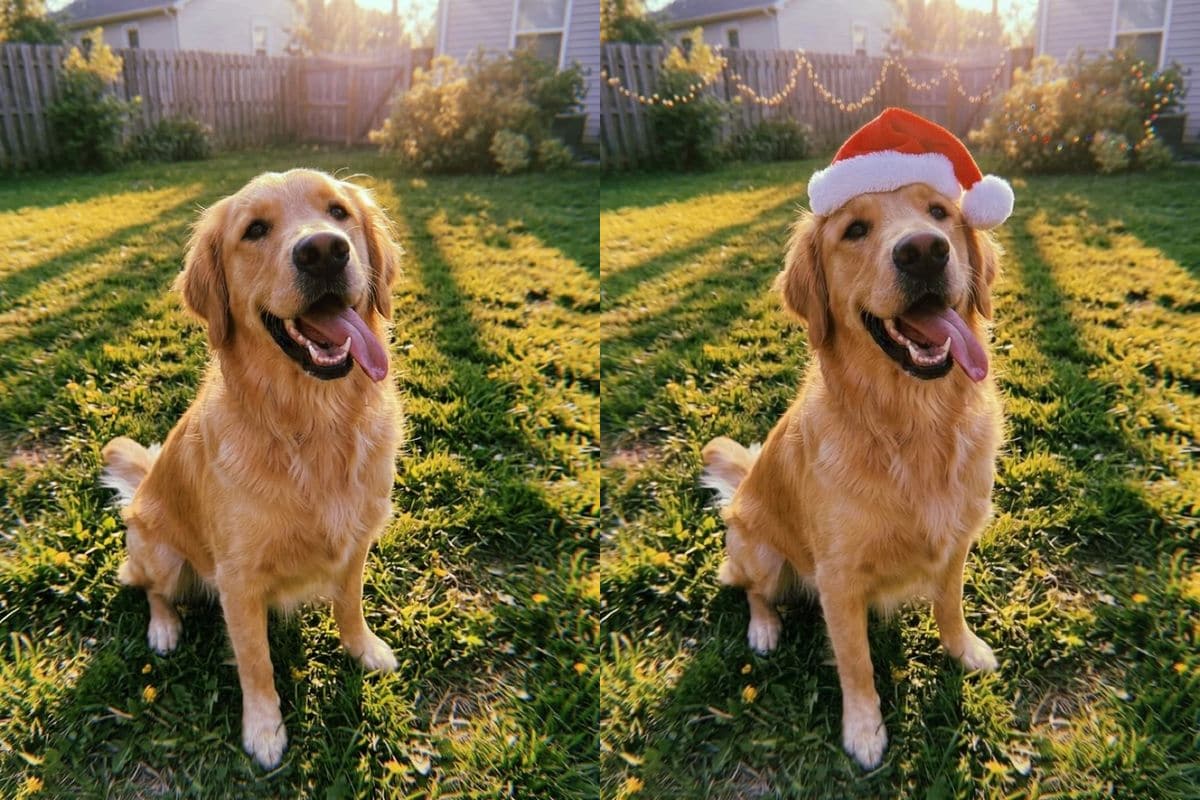
The hat look puts a red Santa hat on everyone in the photo and adds warm lights. On a golden retriever on a lawn it added a hat that sits naturally on the head and a string of fairy lights along the fence, and left the dog and the grass alone. Of the four looks it changes the least of the picture.

PromptPut a red Santa hat on every person and pet in the photo and add soft warm Christmas lights in the background. Keep every face, pose and expression exactly the same.
  • Works on pets
  • Changes the least
A golden retriever on a lawn next to the same dog wearing a red Santa hat, with a string of fairy lights along the fenceOriginalNano Banana 2.1
Fireplace

Christmas morning by the fire

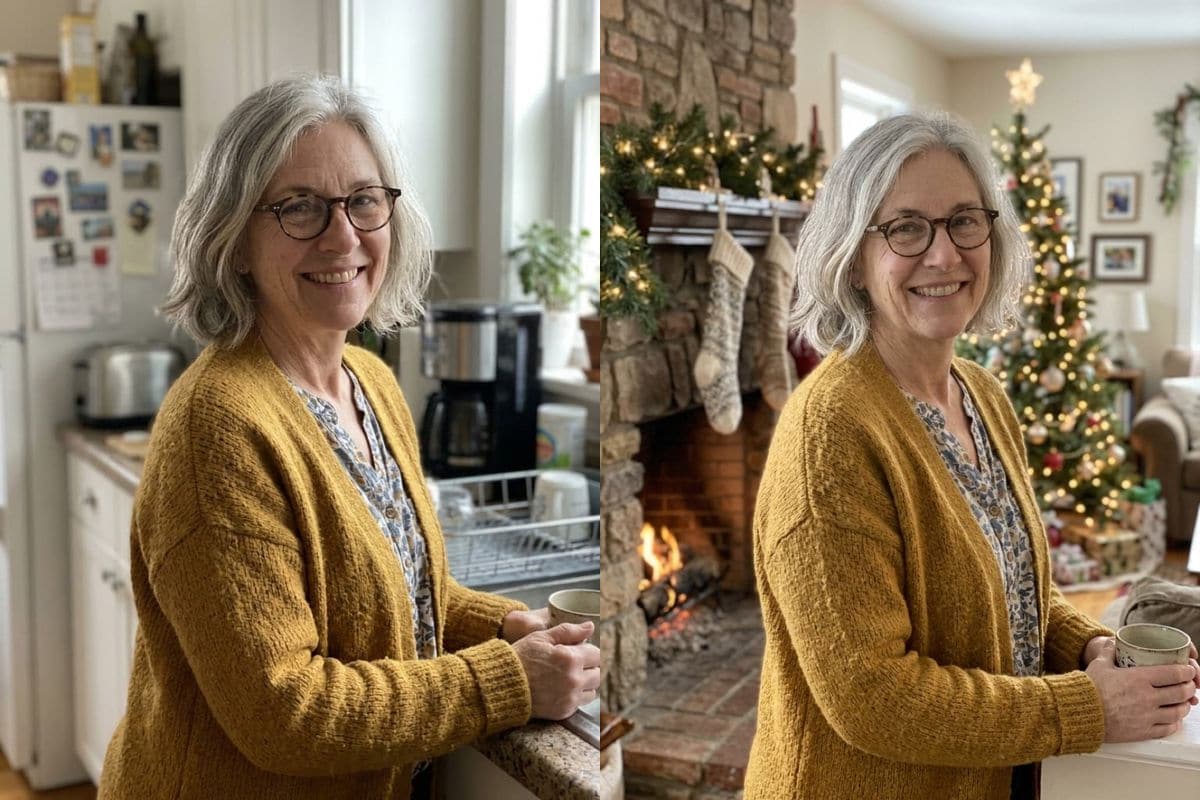
A woman photographed in her kitchen came back in front of a stone fireplace with hanging stockings, a garland and a lit tree. Her face, her glasses and her yellow cardigan are the same. The camera moved closer than in the original, so she fills more of the frame.

PromptPlace them beside a cozy fireplace with hung stockings, a pine garland and a lit Christmas tree, in warm Christmas morning light. Keep every face, pose and expression exactly the same.
  • Face, glasses and clothes kept
  • Camera moves closer
A woman with glasses in a home kitchen next to the same woman in front of a fireplace with stockings and a lit Christmas treeOriginalNano Banana 2.1

Getting a good Christmas photo

Start with a sharp photo where every face is visible and nobody is cut off by the edge. All of our examples were sitting or standing in front of the camera, from the waist up or closer.

Pick the look by how much of the picture should change. Santa hats change the least; the snowy street and the fireplace replace the whole room around you.

If a face comes out wrong, run it again. Each run gives a different picture, and a run that fails costs nothing. For the closest faces, try the same prompt on Nano Banana Pro in the AI image editor: in our tests it kept faces the most faithful.

How to use it

Three steps, no install.

  1. Add one photo

    Upload a JPG, PNG or WebP of the person or the pet. Photos are checked, then deleted about a day after you upload them.

  2. Choose a Christmas look

    Pick one of four looks from the list: a tree and matching sweaters, Santa hats and fairy lights, a snowy street at dusk, or a fireplace on Christmas morning.

  3. Download the result

    Press the button. About 30 seconds later the picture appears under the tool and stays in My images for 30 days.

AI Photo Editor pricing

A standard edit costs 5 credits; larger sizes and premium models cost 8 to 15. Buy a pack once and use it whenever you like. Bigger packs bring the price of a standard edit down from $0.17 to $0.12.

Starter

Try it out

$4.99one-time

30images

$0.17 per imageBase price

150 credits

Basic

Around 70 images

$9.99one-time

70images

$0.14 per imageSave 14%

350 credits

Plus

Around 150 images

$19.99one-time

150images

$0.13 per imageSave 20%

750 credits

Studio

For daily creators

$69.99one-time

600images

$0.12 per imageSave 30%

3,000 credits

Image counts and per-image prices here use 5 credits, what Nano Banana 2.1 costs at 1K. The cost of the model and size you pick always shows before you start.

Secure one-time checkout through Stripe. Buying a pack only adds credits to your account. USD prices. Review the final amount and any applicable tax at checkout before paying. Credits do not automatically renew, and unused credits can be refunded within 7 days of purchase. The credit cost shows before each image; finished results need no second payment to view or download.

AI Christmas photo questions

What is an AI Christmas photo maker?

It turns an ordinary photo into a Christmas photo from a short instruction. You upload one photo, choose a look, and an image model redraws the picture with a tree, sweaters, snow, hats or a fireplace while keeping the people the same.

How much does it cost?

5 credits a photo. New accounts get 5 free credits, enough for one photo. After that, credits come in one-time packs from $4.99, never expire, and there is no subscription. A photo that fails costs nothing.

How long does it take?

About 30 seconds. Nano Banana 2.1, the model behind this tool, took between 20 and 39 seconds in our tests.

Will it keep our faces the same?

Every look ends with an instruction to keep every face, pose and expression the same, and in our four examples the faces, glasses and expressions matched the originals. The framing can change: two of the four came back a little closer than the original. Check each face before you share the picture.

Can I use a photo of my pet?

Yes. The Santa hat look puts a hat on every person and pet in the photo; our example is a golden retriever.

How many people can be in the photo?

We tested a couple and a group of three friends. A larger group has more faces to keep, so look closely at each one.

Which photos can I upload?

One JPEG, PNG or WebP, up to 20 MB.

What happens to my photo?

Uploaded photos are checked, then deleted about a day after you upload them. The result stays in My images for 30 days, and you can download it at any time.

Can I write my own Christmas idea?

Not in this tool, which has four fixed looks. The AI image editor takes any instruction, so you can describe your own scene there.

Is this an official Christmas tool from the model's maker?

AI Photo Editor is an independent site. It is not affiliated with, endorsed by or sponsored by the company that makes the model; model names belong to their owners.

Try the Christmas photo maker on your own photo

New accounts start with free credits. Failed images cost nothing.