
AI photo restoration

Upload a scan or a picture of an old print. In about 30 seconds you get it back without the scratches, creases, stains and torn corners, in colour or still in black and white. Faces and shapes stay as they were.

5 credits a photo. Failed images are free.

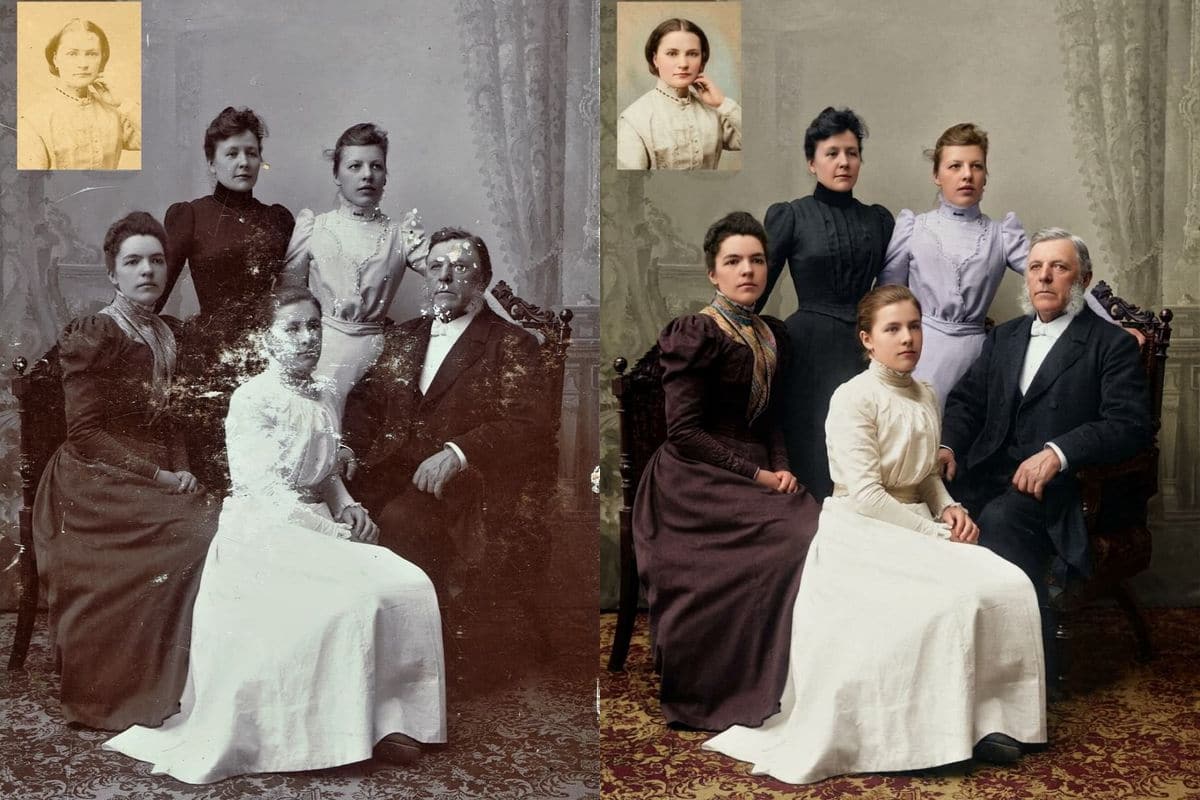
A scratched and flaking sepia studio portrait of a seated man and four women, c. 1907, next to the same photograph repaired and colouredReal photoNano Banana 2.1

Failed generations are refunded.

What the restoration tool repairs

Four of the six, with what came back and what the tool decided on its own.

A family portrait, 1907

Flaking faces and dresses, repaired and coloured

This family portrait from about 1907 lost much of its emulsion: white flakes and scratches cover two of the faces and the dresses. The tool filled them in, kept all five faces and the way the family sits, and coloured the dresses plum, black, lavender and cream against a grey-green backdrop and a red patterned carpet. The small oval portrait in the corner was repaired and coloured too. The colours are the model's estimate, not the real ones.

PromptRestore this old photo: remove the scratches, creases, dust, stains and any flaking or torn damage, repair missing areas and sharpen the details. Add natural, realistic colour. Keep the faces, the shapes and the composition exactly the same.
  • Five faces and poses kept
  • Damaged faces were rebuilt
A scratched and flaking sepia studio portrait of a seated man and four women, c. 1907, next to the same photograph repaired and colouredReal photoNano Banana 2.1
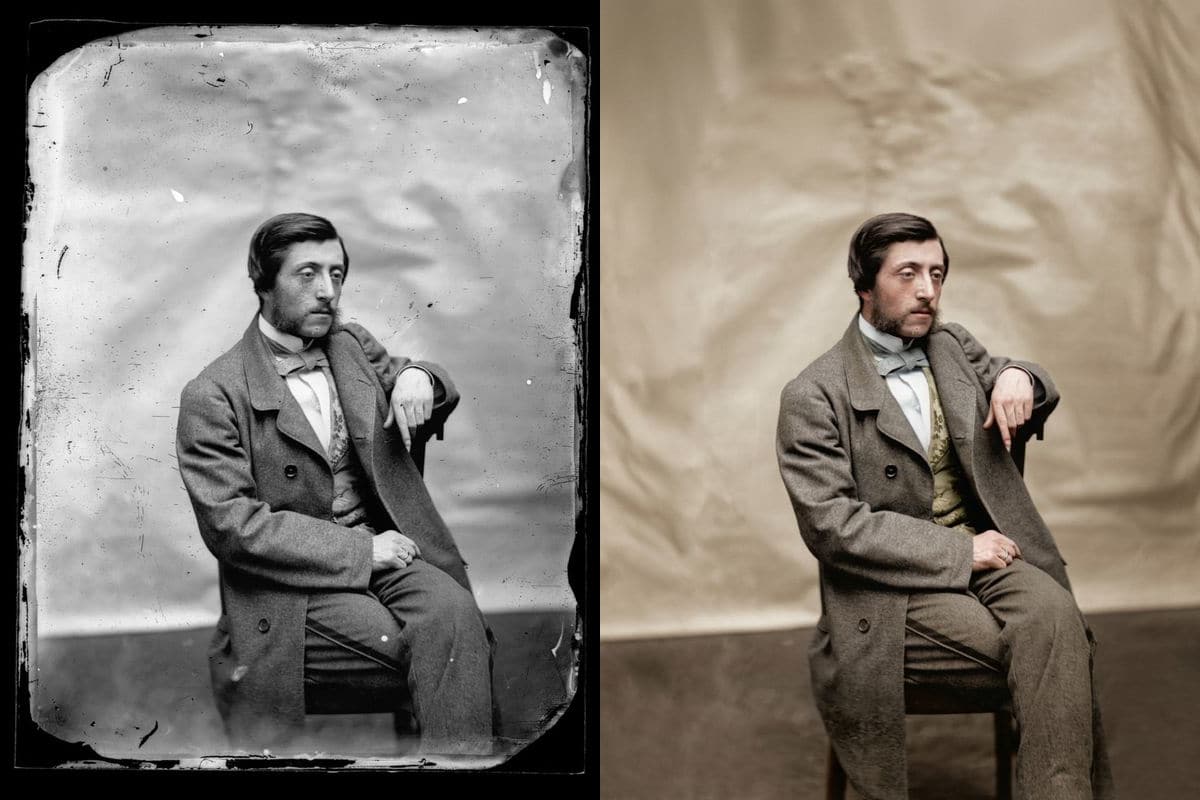
A glass plate, 1858

A black plate border and peeling edges, gone

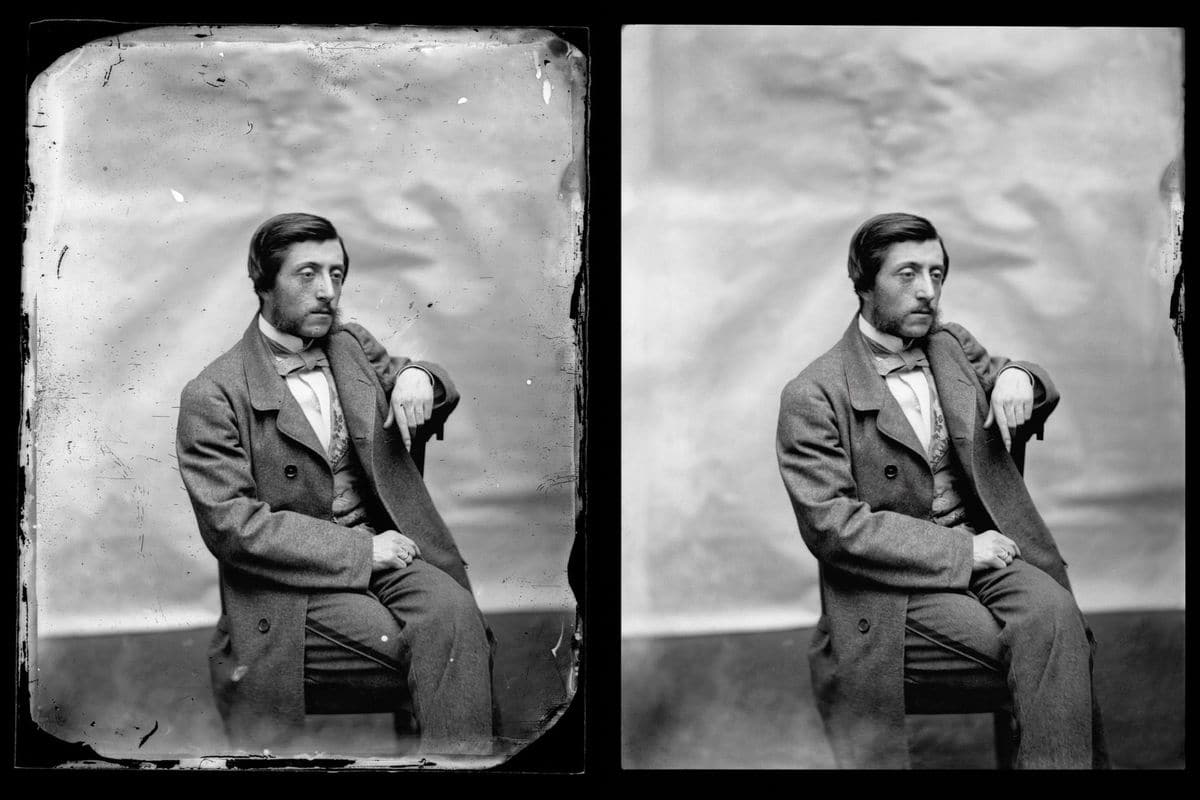
This portrait is a glass plate with a black border, peeling edges and white pinholes. The tool removed the border, evened the backdrop into a plain warm cloth and coloured the coat grey-brown with a pale blue tie. The man's face, pose and clothes are unchanged. The same photo is in the gallery in black and white, for when you want the repair without any colour.

PromptRestore this old photo: remove the scratches, creases, dust, stains and any flaking or torn damage, repair missing areas and sharpen the details. Add natural, realistic colour. Keep the faces, the shapes and the composition exactly the same.
  • Border and pinholes removed
  • Black and white also offered
A damaged 1858 glass-plate portrait of a seated young man with a black plate border next to the same photograph repaired, without the border, and colouredReal photoNano Banana 2.1
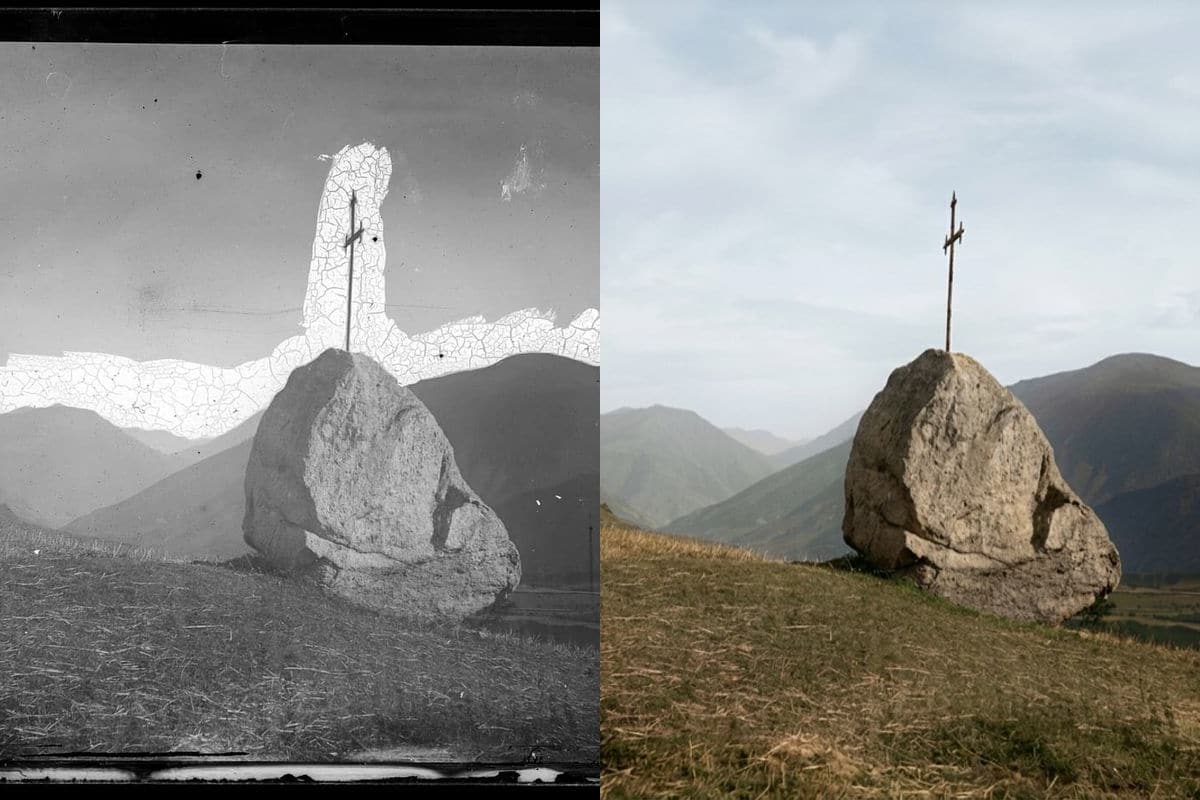
A cracked plate

A band of missing sky, filled in

A wide band of the sky and the horizon on this plate had lost its emulsion. The tool filled the gap with sky and cloud, kept the boulder, the cross and the mountains as they were, and coloured the slope olive and brown and the mountains green-grey. The filled sky is invented, not recovered: nothing in the photograph says what clouds were there.

PromptRestore this old photo: remove the scratches, creases, dust, stains and any flaking or torn damage, repair missing areas and sharpen the details. Add natural, realistic colour. Keep the faces, the shapes and the composition exactly the same.
  • Missing area invented, not recovered
  • Boulder and cross unchanged
A cracked 19th-century glass-plate photograph of a Pyrenees valley with a boulder and a cross, with a band of missing sky, next to the same photograph repaired and colouredReal photoNano Banana 2.1
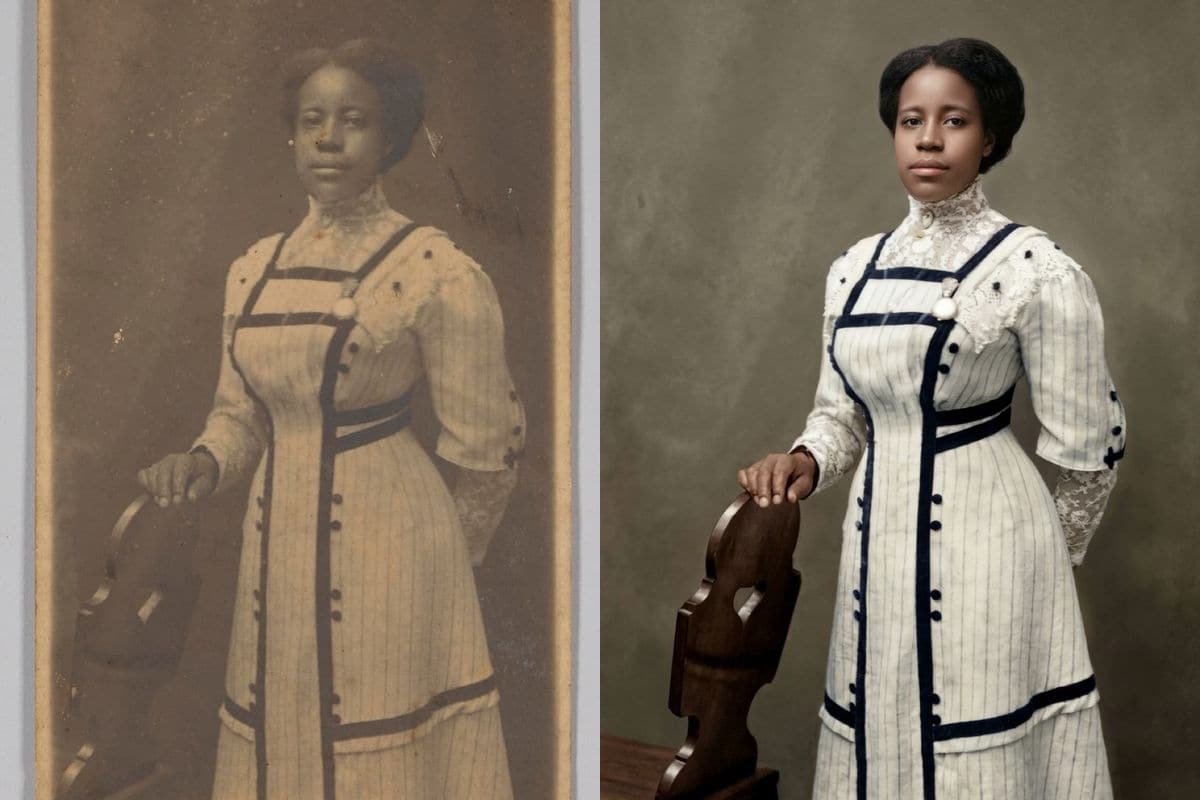
A torn print

A torn corner and a white border, repaired

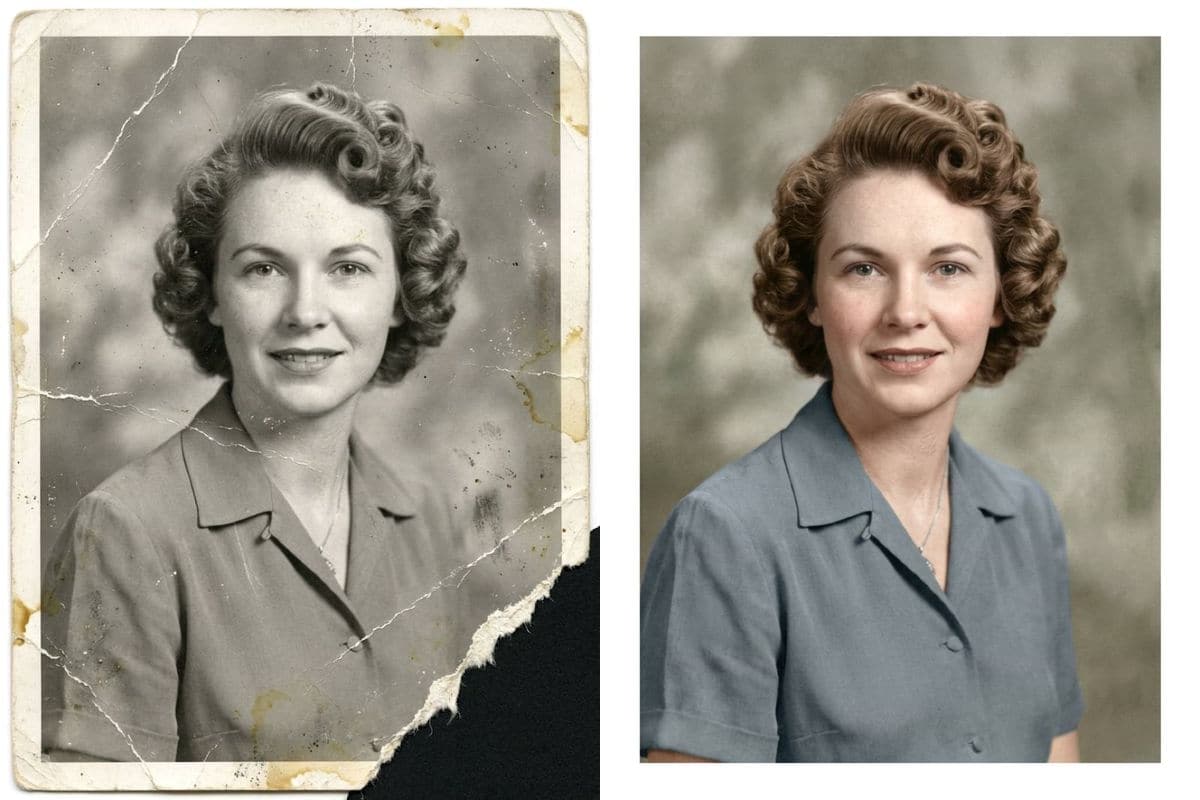
This AI-generated test print is a 1950s portrait with creases, stains, a white border and a torn corner. The tool removed the creases and the stains, completed the torn corner and the border, and added brown hair and a blue blouse. The face is the same woman with the same smile.

PromptRestore this old photo: remove the scratches, creases, dust, stains and any flaking or torn damage, repair missing areas and sharpen the details. Add natural, realistic colour. Keep the faces, the shapes and the composition exactly the same.
  • Creases, stains and torn corner repaired
  • Colour added
A creased, stained black and white portrait print of a woman with a torn corner next to the same photograph repaired and colouredOriginalNano Banana 2.1

Getting a good restoration

Scan the print flat and straight, or photograph it in even light without glare. Results come back about 1,000 pixels on the long side; for a large print, use the AI image editor with Nano Banana Pro at 2K or 4K.

Choose Restore, keep black and white when you want the repair without any colour. Colour is the model's estimate: it cannot know the real colours of a dress or a room, so treat it as one plausible version.

Compare the faces with the original before you share the result. Where damage covered a face, the tool rebuilds it, and a rebuilt face can differ from the person.

How to use it

Three steps, no install.

  1. Add one photo

    Upload a JPG, PNG or WebP of the person or the pet. Photos are checked, then deleted about a day after you upload them.

  2. Choose colour or black and white

    Pick Restore and add colour, or Restore, keep black and white. The repair is the same; only the colour changes.

  3. Download the result

    Press the button. About 30 seconds later the picture appears under the tool and stays in My images for 30 days.

AI Photo Editor pricing

A standard edit costs 5 credits; larger sizes and premium models cost 8 to 15. Buy a pack once and use it whenever you like. Bigger packs bring the price of a standard edit down from $0.17 to $0.12.

Starter

Try it out

$4.99one-time

30images

$0.17 per imageBase price

150 credits

Basic

Around 70 images

$9.99one-time

70images

$0.14 per imageSave 14%

350 credits

Plus

Around 150 images

$19.99one-time

150images

$0.13 per imageSave 20%

750 credits

Studio

For daily creators

$69.99one-time

600images

$0.12 per imageSave 30%

3,000 credits

Image counts and per-image prices here use 5 credits, what Nano Banana 2.1 costs at 1K. The cost of the model and size you pick always shows before you start.

Secure one-time checkout through Stripe. Buying a pack only adds credits to your account. USD prices. Review the final amount and any applicable tax at checkout before paying. Credits do not automatically renew, and unused credits can be refunded within 7 days of purchase. The credit cost shows before each image; finished results need no second payment to view or download.

AI photo restoration questions

What is AI photo restoration?

It repairs the damage in an old photo. You upload a scan or a picture of the print, and an image model removes scratches, creases, dust, stains and flaking, fills in missing and torn areas, sharpens the details and, if you choose, adds colour.

How much does it cost?

5 credits a photo. New accounts get 5 free credits, enough for one photo. After that, credits come in one-time packs from $4.99, never expire, and there is no subscription. A photo that fails costs nothing.

How long does it take?

About 30 seconds. Nano Banana 2.1, the model behind this tool, took between 20 and 39 seconds in our tests.

Will the faces stay the same?

The request ends with an instruction to keep the faces, the shapes and the composition the same, and in our examples the people matched the originals. Where the damage covered a face, the tool had to rebuild it, so compare the result with the original before you rely on it.

Are the colours the real colours?

No. A black and white photo does not record colour, so the model estimates it from the clothes, the setting and the period. Treat the colours as one plausible version. If you know a colour, say so in the AI image editor.

Can I keep the photo black and white?

Yes. Choose Restore, keep black and white. The tool repairs the damage and adds no colour.

What kinds of damage can it fix?

In our examples: scratches, creases, stains, dust, flaking emulsion, a black glass-plate border, pinholes, a torn corner and a band of missing sky. Heavy damage over a face is the hardest case.

Which photos can I upload?

One JPEG, PNG or WebP, up to 20 MB. A scan or a straight, evenly lit picture of the print works best.

What happens to my photo?

Uploaded photos are checked, then deleted about a day after you upload them. The result stays in My images for 30 days, and you can download it at any time.

Is this the official tool of the model's maker?

AI Photo Editor is an independent site. It is not affiliated with, endorsed by or sponsored by the company that makes the model; model names belong to their owners.

Try the photo restoration tool on your own photo

New accounts start with free credits. Failed images cost nothing.