
AI clothes changer

Upload a photo, choose an outfit and get the same person in new clothes in about 30 seconds. The face, the hair, the pose and the background stay as they were.

5 credits a photo. Failed images are free.

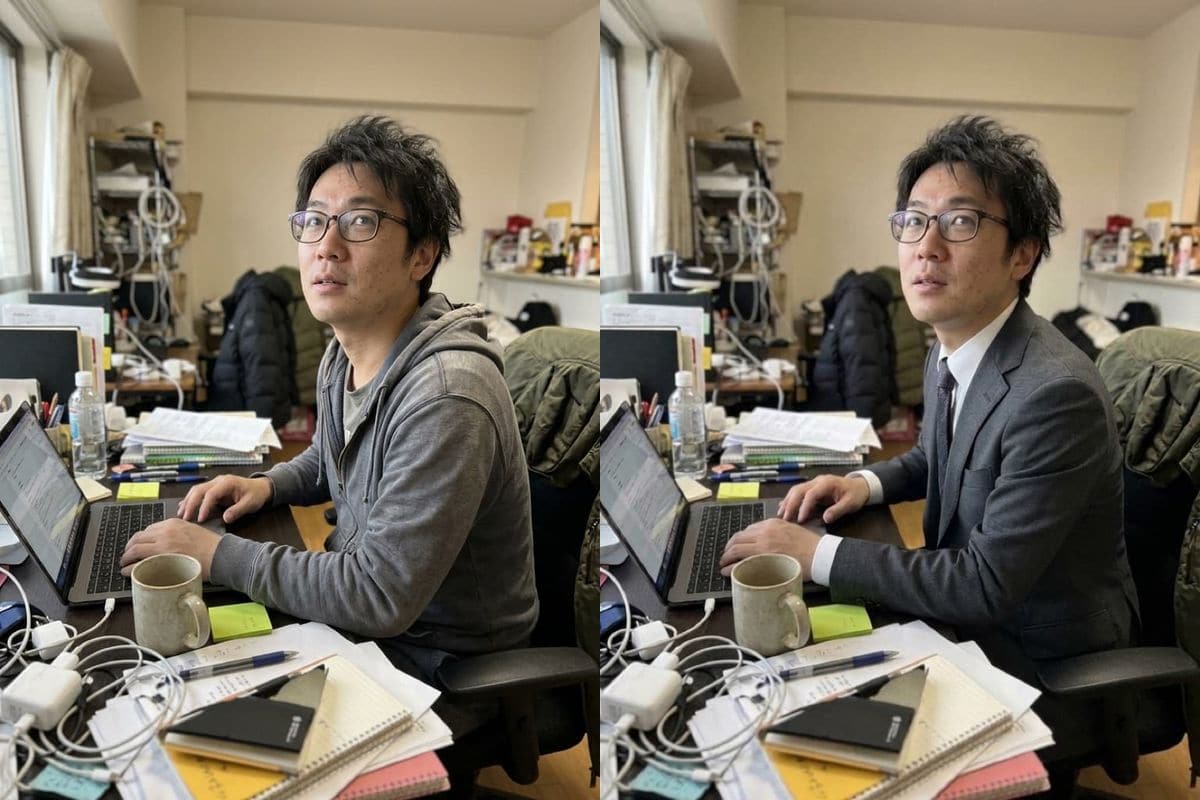
A man in glasses and a grey hoodie at a cluttered desk next to the same man in a charcoal suit with a white shirt and a dark tieOriginalNano Banana 2.1

Failed generations are refunded.

What the clothes changer does to a photo

Four of the eight outfits in the list, each on a different photo. We show what came back, including what changed that we had not asked for.

Business suit

From a grey hoodie to a charcoal suit

A man in glasses and a grey hoodie at a cluttered desk came back in a charcoal suit, a white shirt and a dark tie. His glasses, his hair, the way he sits at the laptop and the messy desk are all unchanged; only the clothes were redrawn.

PromptChange the person's outfit to a tailored charcoal business suit with a white shirt and a dark tie. Keep the face, hair, body shape, pose and the background exactly the same.
  • Glasses, hair and pose kept
  • Background untouched
A man in glasses and a grey hoodie at a cluttered desk next to the same man in a charcoal suit with a white shirt and a dark tieOriginalNano Banana 2.1
Evening dress

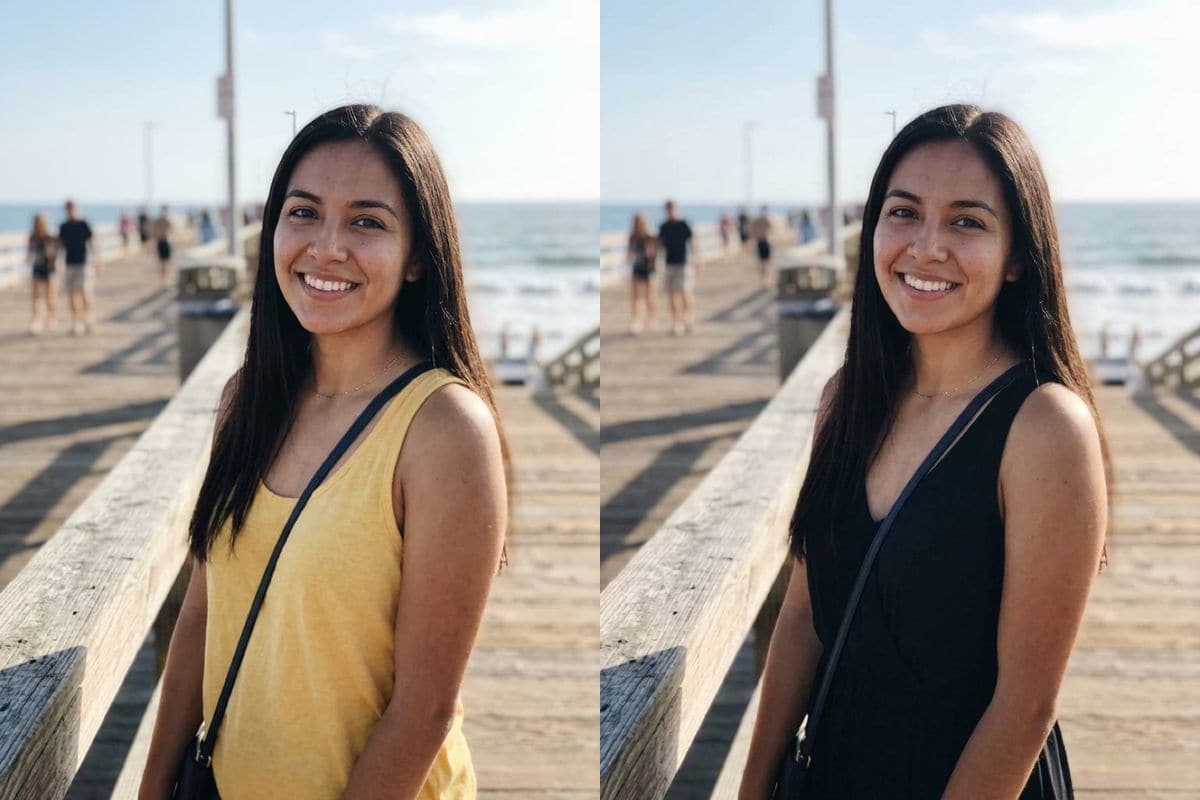
A yellow top becomes a black evening dress

A woman in a yellow top on a seaside boardwalk came back in a black evening dress. Her face, her hair and the sea behind her are the same, and the bag strap she wore across her chest is gone. The photo is cropped at the waist, so only the top of the dress shows; use a full-length photo to see the whole garment.

PromptChange the person's outfit to an elegant long black evening dress. Keep the face, hair, body shape, pose and the background exactly the same.
  • Face and hair kept
  • Bag strap disappeared
A woman in a yellow top on a seaside boardwalk next to the same woman in a black evening dressOriginalNano Banana 2.1
Leather jacket

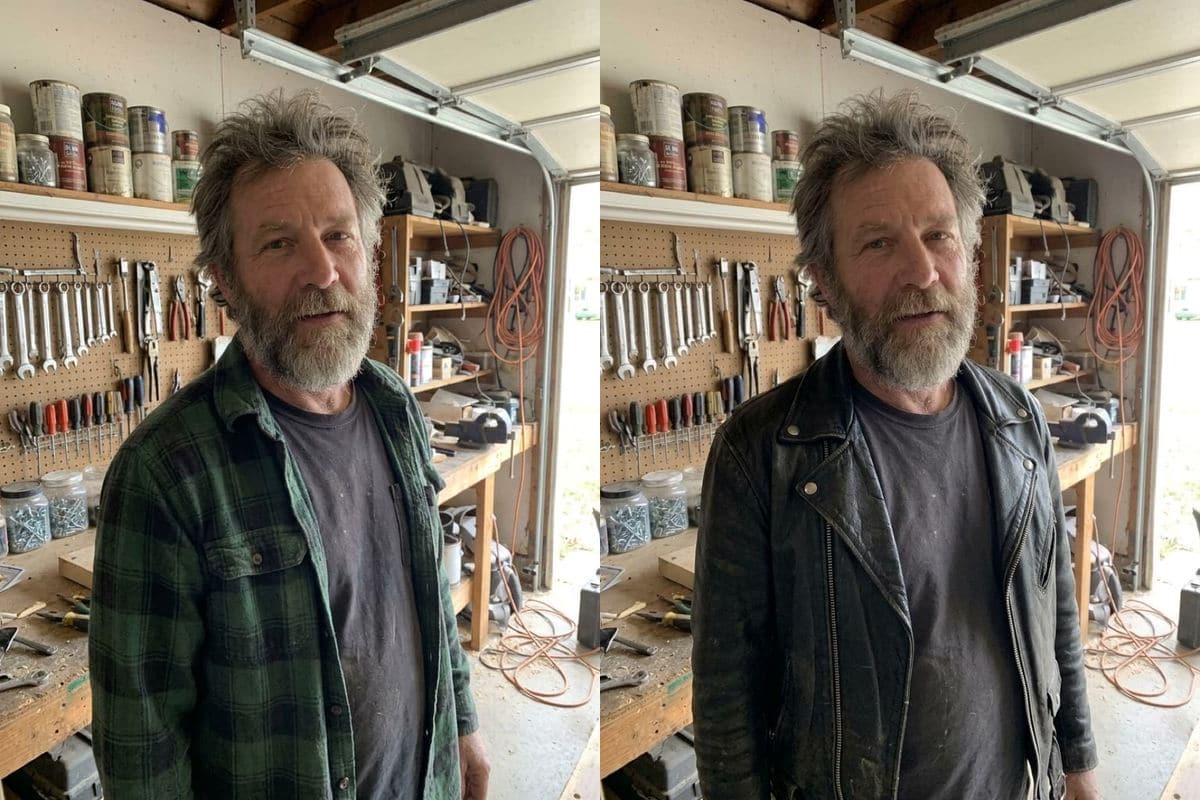
A flannel shirt becomes a leather jacket

A bearded man in a green flannel shirt in a garage workshop came back in a black leather jacket with creases, a collar and a zip. His face, his beard and his hair are the same, and so is the workshop. The T-shirt under the jacket stayed dark.

PromptChange the person's outfit to a black leather jacket over a grey T-shirt. Keep the face, hair, body shape, pose and the background exactly the same.
  • Face, beard and hair kept
  • Creased leather texture
A bearded man in a green flannel shirt in a garage workshop next to the same man in a black leather jacketOriginalNano Banana 2.1
Dress

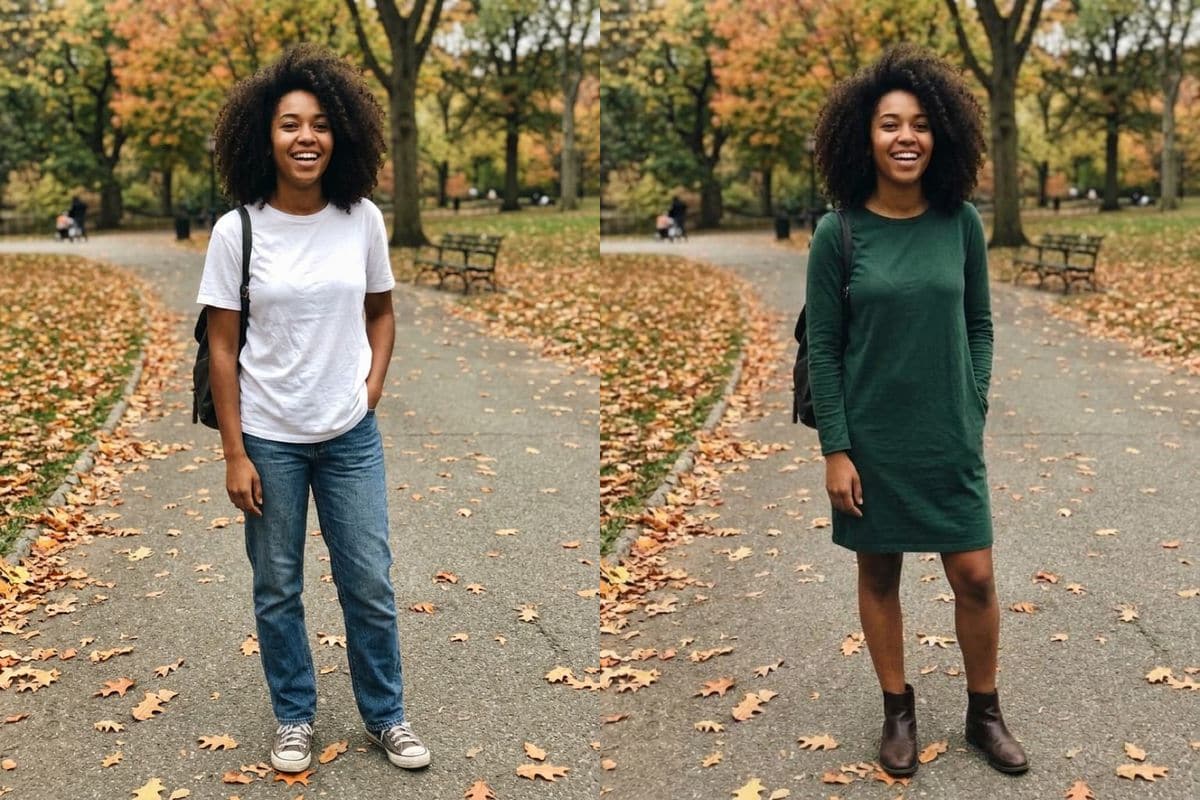
Jeans and a T-shirt become a dress and boots

A woman in jeans and a white T-shirt on an autumn park path came back in a knee-length dark green dress and ankle boots, standing exactly as she was. Her face, her curly hair and the path behind her match the original. The dress has long sleeves, which we had not specified; choose Describe my own to say the sleeve length.

PromptChange the person's outfit to a knee-length dark green dress with ankle boots. Keep the face, hair, body shape, pose and the background exactly the same.
  • Pose and park unchanged
  • Sleeves were the model's choice
A woman in jeans and a white T-shirt on an autumn park path next to the same woman in a knee-length dark green dress and ankle bootsOriginalNano Banana 2.1

Getting a good result from the clothes changer

Use a clear photo of the person facing the camera. For a long garment such as a dress or a coat, use a photo that shows the whole length, because the model can only redraw what is in the picture.

Choose Describe my own for anything not on the list, and give the colour, the cut and the length: for example "a yellow raincoat and rubber boots" or "a short-sleeved white linen shirt".

Check the small things afterwards. In our examples a bag strap disappeared and a sleeve length was chosen for us, and the model redraws every item of clothing, not only the one you named.

How to use it

Three steps, no install.

  1. Add one photo

    Upload a JPG, PNG or WebP of the person or the pet. Photos are checked, then deleted about a day after you upload them.

  2. Choose an outfit

    Pick one of eight outfits from the list, or choose Describe my own and write the outfit in a few words.

  3. Download the result

    Press the button. About 30 seconds later the picture appears under the tool and stays in My images for 30 days.

AI Photo Editor pricing

A standard edit costs 5 credits; larger sizes and premium models cost 8 to 15. Buy a pack once and use it whenever you like. Bigger packs bring the price of a standard edit down from $0.17 to $0.12.

Starter

Try it out

$4.99one-time

30images

$0.17 per imageBase price

150 credits

Basic

Around 70 images

$9.99one-time

70images

$0.14 per imageSave 14%

350 credits

Plus

Around 150 images

$19.99one-time

150images

$0.13 per imageSave 20%

750 credits

Studio

For daily creators

$69.99one-time

600images

$0.12 per imageSave 30%

3,000 credits

Image counts and per-image prices here use 5 credits, what Nano Banana 2.1 costs at 1K. The cost of the model and size you pick always shows before you start.

Secure one-time checkout through Stripe. Buying a pack only adds credits to your account. USD prices. Review the final amount and any applicable tax at checkout before paying. Credits do not automatically renew, and unused credits can be refunded within 7 days of purchase. The credit cost shows before each image; finished results need no second payment to view or download.

AI clothes changer questions

What is an AI clothes changer?

It puts the person in a photo into different clothes. You upload one photo, choose an outfit, and an image model redraws the clothes while keeping the face, the hair, the pose and the background.

How much does it cost?

5 credits a photo. New accounts get 5 free credits, enough for one photo. After that, credits come in one-time packs from $4.99, never expire, and there is no subscription. A photo that fails costs nothing.

Does it keep my face the same?

Every outfit ends with an instruction to keep the face, hair, body shape, pose and background the same, and in our four examples the faces, hair and backgrounds matched the originals. Small details such as a bag strap can change, so look at the whole picture.

Can I describe my own outfit?

Yes. Choose Describe my own, then write the garment in up to 120 characters, for example a yellow raincoat and rubber boots.

Which outfits are on the list?

Business suit, navy blazer, hoodie, leather jacket, cozy knit sweater, dress, evening dress and sportswear.

Does it work on men and women?

Yes. Our examples include two men and two women. The outfit list is not tied to a gender, so you can put anyone in any of them.

Can I try on a particular item from a shop?

No. The tool works from a written description of the outfit, not from a photo of a garment, so it shows a similar style rather than that exact item.

What happens to my photo?

Uploaded photos are checked, then deleted about a day after you upload them. The result stays in My images for 30 days, and you can download it at any time.

Is this the official tool of the model's maker?

AI Photo Editor is an independent site. It is not affiliated with, endorsed by or sponsored by the company that makes the model; model names belong to their owners.

Try the clothes changer on your own photo

New accounts start with free credits. Failed images cost nothing.