
Colorize photo

Upload a black and white photo and press the button. About 30 seconds later you get it back in natural colour, with every face and detail where it was. There is nothing to set.

5 credits a photo. Failed images are free.

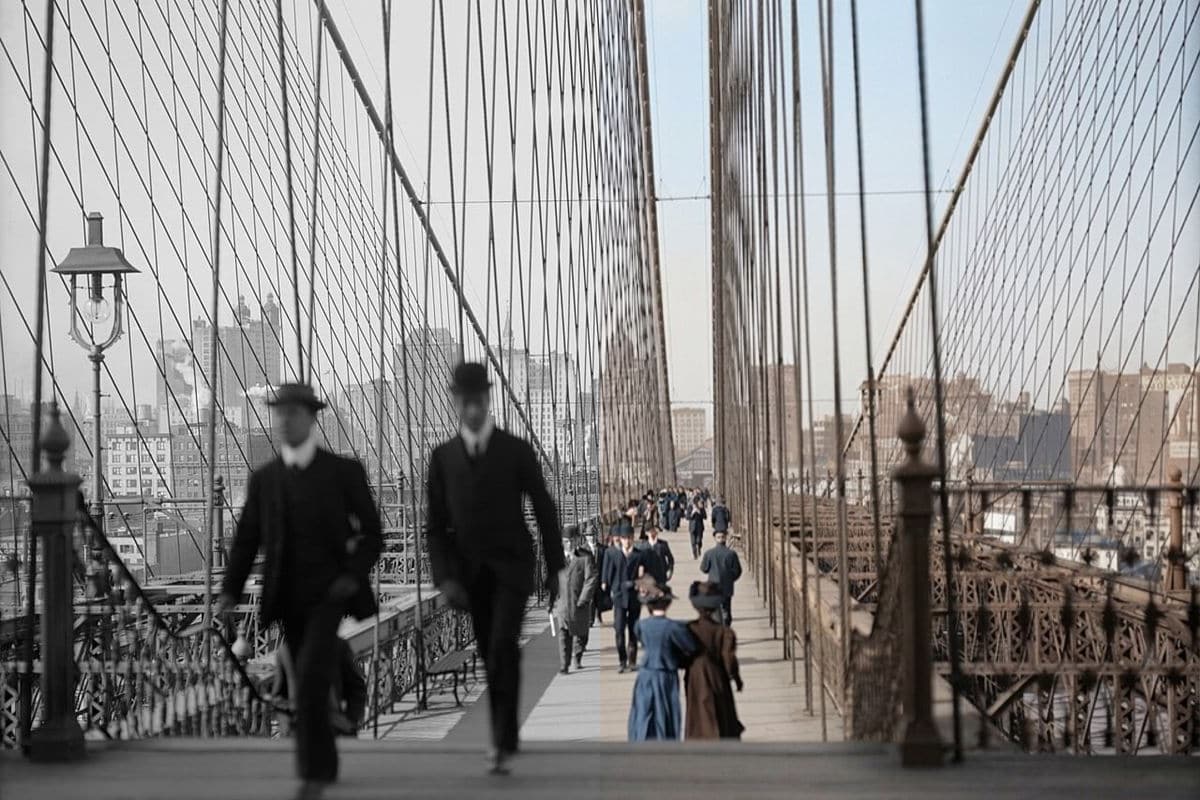
Brooklyn Bridge in black and white on the left half and the same photograph coloured on the right half, with walkers and a crowd on the footwayReal photoNano Banana 2.1

Failed generations are refunded.

What the colorize tool does

The three examples, with what came back and what the tool decided on its own.

Brooklyn Bridge, about 1905

A crowd in dark suits and blue dresses

The walkers on the footway came back in dark suits and hats and blue and brown dresses, the sky turned pale blue, and the ironwork and the buildings behind took a warm brown. Every person and every cable is where it was in the original. The colours of the clothes are guesses, which is why the crowd looks so dark.

PromptColorize this black and white photo with natural, realistic colours for skin, clothing, buildings, sky and nature. Keep every detail, face and the composition exactly the same.
  • People and cables unchanged
  • Clothes colours are guesses
Brooklyn Bridge in black and white on the left half and the same photograph coloured on the right half, with walkers and a crowd on the footwayReal photoNano Banana 2.1
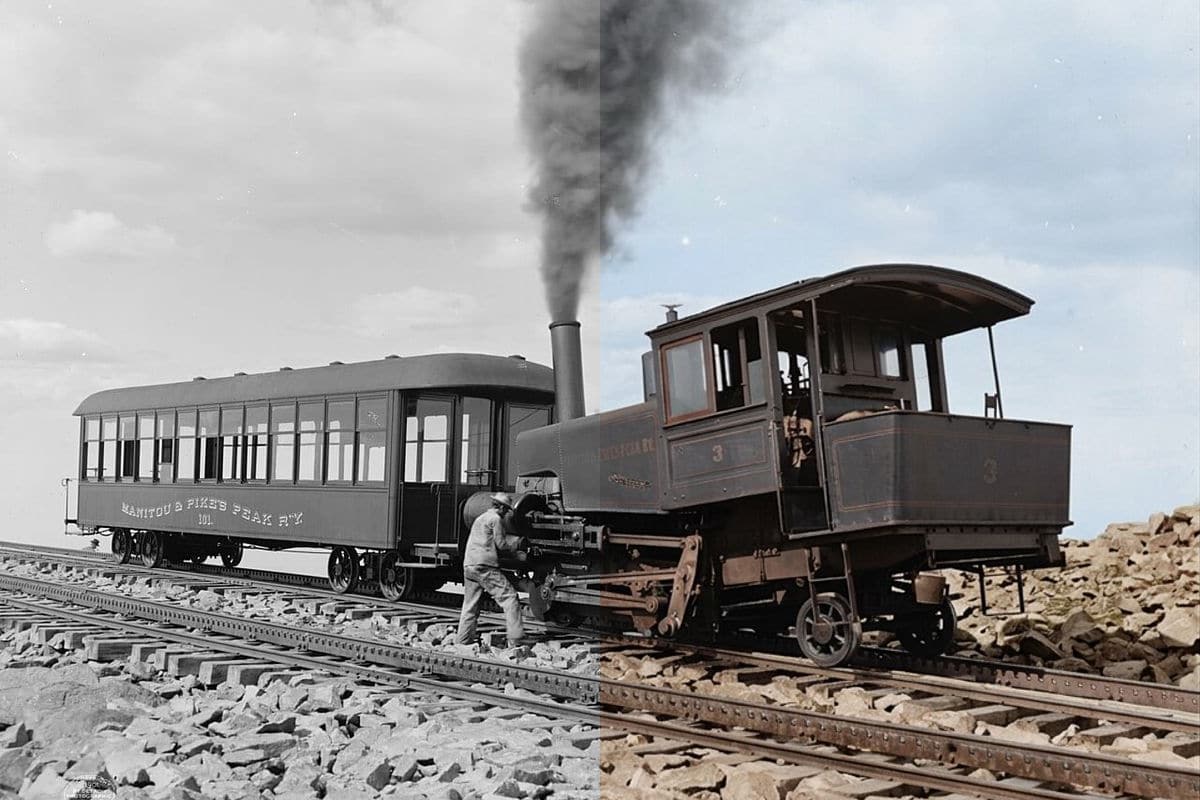
A cog railway, about 1900

A steam engine at a mountain summit

The engine and the carriage came back in a dark green-brown with a rust-brown frame and wheels, the rocks in warm tan and the sky in a pale grey-blue. The smoke stayed dark and the worker beside the engine stayed where he stood. Painted metal is where the model guessed most: the real engine could have been any dark colour.

PromptColorize this black and white photo with natural, realistic colours for skin, clothing, buildings, sky and nature. Keep every detail, face and the composition exactly the same.
  • Metal colours are guesses
  • Smoke and worker unchanged
A steam cog railway engine and carriage at a mountain summit in black and white on the left half and the same photograph coloured on the right halfReal photoNano Banana 2.1
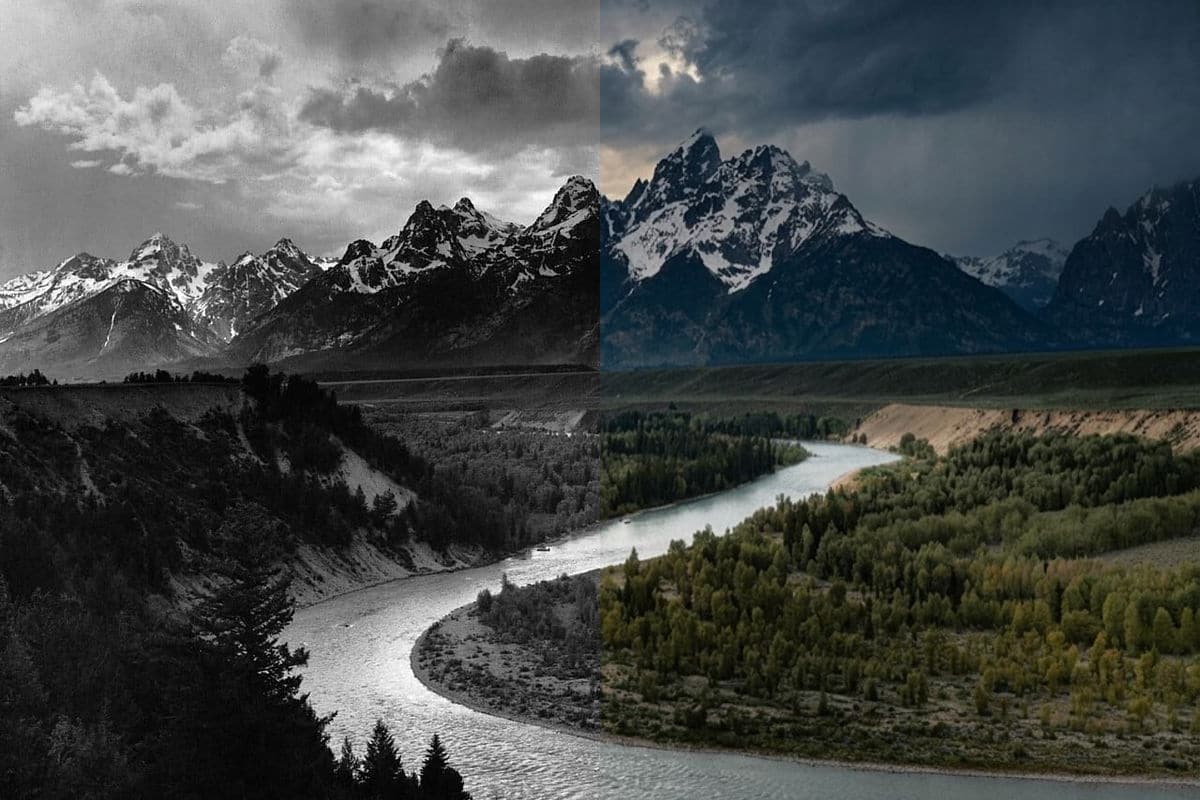
The Tetons, 1942

A river valley under a darker sky

The grass and the trees along the Snake River came back olive green and the river blue-green. The model also made the sky much darker and bluer than the pale clouds in the original photograph, so read this one as a dramatic interpretation, not a record. If a result is darker than your photo, run it again or try the AI image editor with a prompt that names the light.

PromptColorize this black and white photo with natural, realistic colours for skin, clothing, buildings, sky and nature. Keep every detail, face and the composition exactly the same.
  • Sky darker than the original
  • Landscape colours plausible
Ansel Adams photograph of the Tetons above the Snake River in black and white on the left half and the same photograph coloured, with a darker sky, on the right halfReal photoNano Banana 2.1

Getting a good colorized photo

Use a sharp black and white photo. This tool adds colour and nothing else: if the photo has scratches, stains or torn corners, use the photo restoration tool, which can repair it and add colour in one go.

Colours are the model's estimate, so check what you know. If a coat was red or a train was green, say so in the AI image editor, which takes a written instruction.

Results come back about 1,000 pixels on the long side. For a large print, use the AI image editor with Nano Banana Pro at 2K or 4K.

How to use it

Three steps, no install.

  1. Add one photo

    Upload a JPG, PNG or WebP of the person or the pet. Photos are checked, then deleted about a day after you upload them.

  2. Press the button

    There are no settings. The tool adds natural colour to the whole photograph and leaves the faces, the shapes and the composition alone.

  3. Download the result

    Press the button. About 30 seconds later the picture appears under the tool and stays in My images for 30 days.

AI Photo Editor pricing

A standard edit costs 5 credits; larger sizes and premium models cost 8 to 15. Buy a pack once and use it whenever you like. Bigger packs bring the price of a standard edit down from $0.17 to $0.12.

Starter

Try it out

$4.99one-time

30images

$0.17 per imageBase price

150 credits

Basic

Around 70 images

$9.99one-time

70images

$0.14 per imageSave 14%

350 credits

Plus

Around 150 images

$19.99one-time

150images

$0.13 per imageSave 20%

750 credits

Studio

For daily creators

$69.99one-time

600images

$0.12 per imageSave 30%

3,000 credits

Image counts and per-image prices here use 5 credits, what Nano Banana 2.1 costs at 1K. The cost of the model and size you pick always shows before you start.

Secure one-time checkout through Stripe. Buying a pack only adds credits to your account. USD prices. Review the final amount and any applicable tax at checkout before paying. Credits do not automatically renew, and unused credits can be refunded within 7 days of purchase. The credit cost shows before each image; finished results need no second payment to view or download.

Colorize photo questions

How do I colorize a black and white photo?

Upload the photo and press the button. An image model adds colour to the skin, the clothes, the buildings, the sky and nature, and keeps every detail, face and the composition the same.

How much does it cost?

5 credits a photo. New accounts get 5 free credits, enough for one photo. After that, credits come in one-time packs from $4.99, never expire, and there is no subscription. A photo that fails costs nothing.

Are the colours accurate?

No. A black and white photo does not record colour, so the model estimates it from what it sees. The result is one plausible version, not the real colours. Skin tones and nature are usually believable; painted objects and clothes are guesses.

Does it fix scratches and stains?

No. This tool only adds colour. For a damaged photo use the photo restoration tool, which repairs scratches, creases, stains and torn corners and can add colour in the same run.

Can I choose the colours?

Not in this tool. In the AI image editor you can write an instruction such as a red coat and a green train, and pick a model.

Which photos work?

We tested sharp black and white photographs, including a street, a landscape and a train. Sepia or damaged prints are better with the restoration tool.

How long does it take?

About 30 seconds. Nano Banana 2.1, the model behind this tool, took between 20 and 51 seconds in our tests.

What happens to my photo?

Uploaded photos are checked, then deleted about a day after you upload them. The result stays in My images for 30 days, and you can download it at any time.

Is this the official tool of the model's maker?

AI Photo Editor is an independent site. It is not affiliated with, endorsed by or sponsored by the company that makes the model; model names belong to their owners.

Try the colorize tool on your own photo

New accounts start with free credits. Failed images cost nothing.