
Remove person from photo

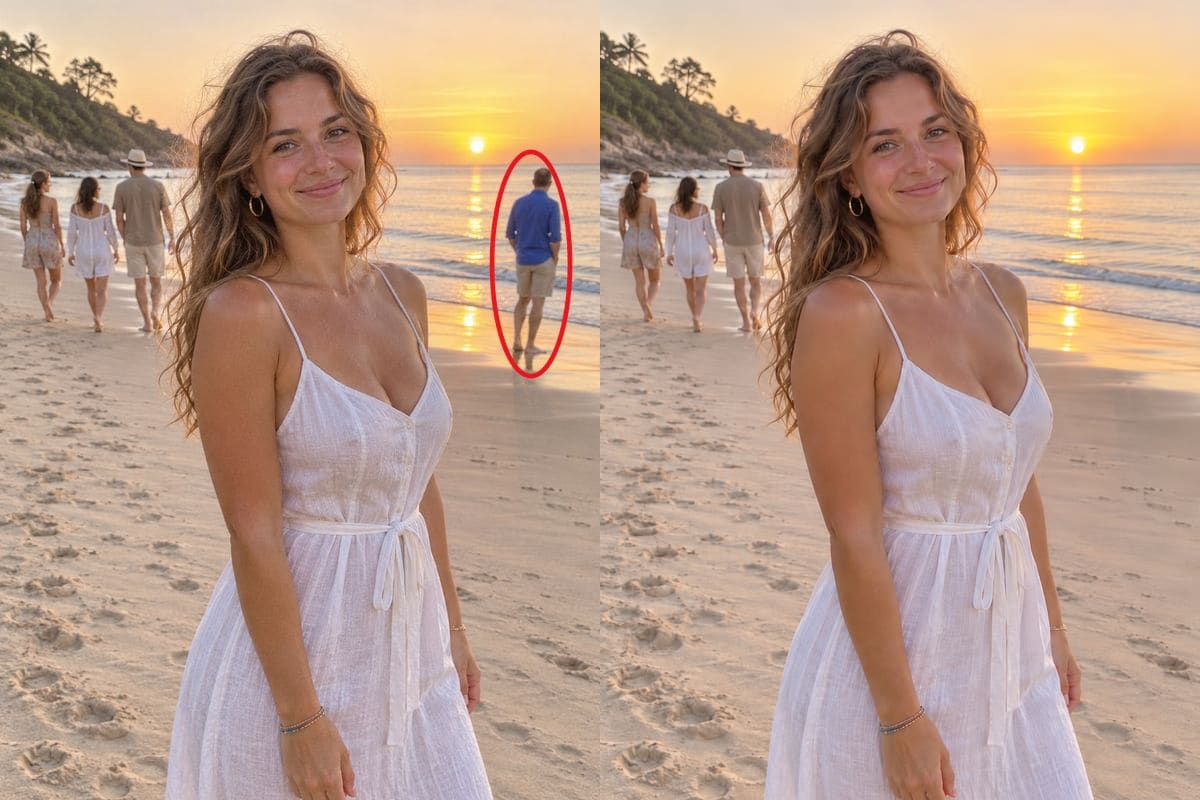
Circle the person you want gone, or just say who, and the background is drawn back in behind them. The people you keep, the faces and the light stay as they were. The photo below is loaded with a circle already on it: press Generate to see it work, then try your own photo.

5 credits a photo. Failed images are free.

A woman in a white dress on a beach at sunrise with a red ring drawn around a man in a blue shirt behind her, next to the same photo with only that man removed, made by GPT Image 2.6CircledGPT Image 2.6 Flare
No photo? Try one:

Failed generations are refunded.

Two ways to remove a person from a photo

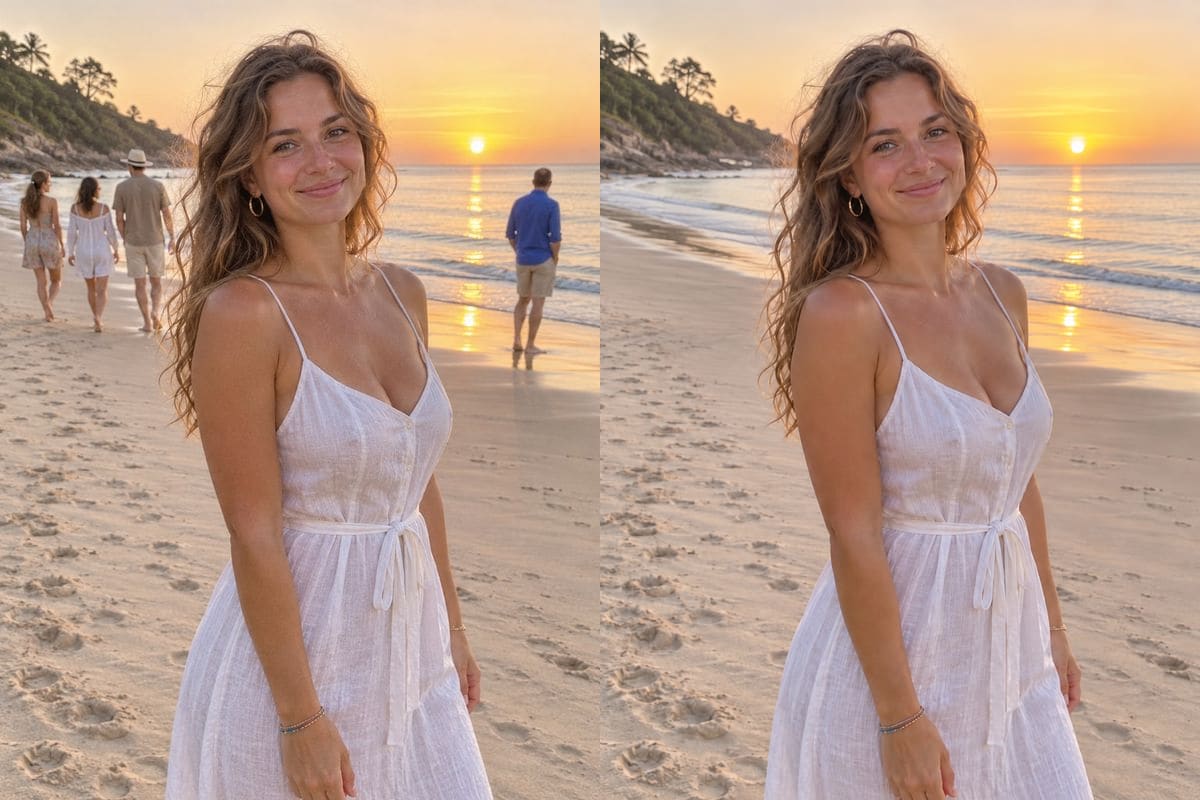
Both examples start from the same photo, made with GPT Image 2.6 for this test: a woman on a beach at sunrise with four strangers behind her. Use this photo loads the photo, the marks and the words into the tool above.

Circle one person

Remove only the man in the blue shirt

We drew a ring around the man standing at the water's edge and wrote one line. GPT Image 2.6 took out only him: the sea and the sunlit water behind him came back, and the three people walking along the shore, the woman in front and the light stayed exactly as they were. This is what drawing is for: when there are several people and only one should go, a circle is clearer than a description. 24 seconds.

PromptRemove only the man I circled. Keep everyone else, the beach and the light exactly the same.
  • One person removed
  • 24 seconds
  • 5 credits
A woman in a white dress on a beach at sunrise with a red ring drawn around a man in a blue shirt behind her, next to the same photo with only that man removed, made by GPT Image 2.6CircledGPT Image 2.6 Flare
Say who to remove

Remove everyone behind her

With no drawing at all, we asked for the people in the background to go and for the woman, the beach and the light to stay. All four strangers were removed, the shoreline and the water were rebuilt where they had been, and her face, her dress and the sunrise did not change. Words are quicker when everyone behind the subject should go. 13 seconds.

PromptRemove all the people in the background. Keep the woman in the white dress, the beach and the light exactly the same.
  • Four people removed
  • 13 seconds
  • 5 credits
A woman in a white dress on a beach at sunrise with four strangers behind her, next to the same photo with all of them removed, made by GPT Image 2.6OriginalGPT Image 2.6 Flare

Tips for removing a person cleanly

Circle the whole person, feet to head, and a little of the ground around them. A ring that cuts through someone leaves a piece of them behind.

Say what must stay. "Keep everyone else, the beach and the light exactly the same" stops the model from changing the faces and the colours you want to keep.

The model redraws the whole picture, so look at the faces and the hands of the people you kept. If something moved, run it again; the same words can give a slightly different picture.

A person who overlaps another person is the hard case. Circle only the one to remove and say who stays; if a trace is left, circle it again on the result.

Only edit photos you own or have the right to edit.

How to use it

Three steps, no install.

  1. Add your photo

    Upload a JPG, PNG or WebP. Photos are checked, then deleted about a day after you upload them. Up to 5 photos can go into one edit.

  2. Circle the person, or say what to remove

    Press Draw to edit under the photo and circle, point at or scribble over the person. Then write one line, for example "Remove the one I circled". You can also skip the drawing and just describe it in words.

  3. Download the result

    Press Generate. About 15 to 25 seconds later the picture appears under the tool and stays in My images for 30 days. If a trace is left, circle it again and run it on the result.

AI Photo Editor pricing

A standard edit costs 5 credits; larger sizes and premium models cost 8 to 15. Buy a pack once and use it whenever you like. Bigger packs bring the price of a standard edit down from $0.17 to $0.12.

Starter

Try it out

$4.99one-time

30images

$0.17 per imageBase price

150 credits

Basic

Around 70 images

$9.99one-time

70images

$0.14 per imageSave 14%

350 credits

Plus

Around 150 images

$19.99one-time

150images

$0.13 per imageSave 20%

750 credits

Studio

For daily creators

$69.99one-time

600images

$0.12 per imageSave 30%

3,000 credits

Image counts and per-image prices here use 5 credits, what GPT Image 2.6 costs at 1K. The cost of the model and size you pick always shows before you start.

Secure one-time checkout through Stripe. Buying a pack only adds credits to your account. USD prices. Review the final amount and any applicable tax at checkout before paying. Credits do not automatically renew, and unused credits can be refunded within 7 days of purchase. The credit cost shows before each image; finished results need no second payment to view or download.

Remove person from photo questions

How do I remove a person from a photo?

Upload the photo, press Draw to edit and circle the person, then write one line such as "Remove the person I circled" and press Generate. About 15 to 25 seconds later you have the photo back with the person gone and the background filled in. You can also skip the circle and describe who to remove.

Can I remove just one person from a group?

Yes, that is what the circle is for. In our test one man out of four people in the background was removed and the other three stayed where they were.

How much does it cost?

5 credits a photo at 1K. New accounts get 5 free credits, enough for one photo. After that, credits come in one-time packs from $4.99, never expire, and there is no subscription. A photo that fails costs nothing.

Does it change the rest of the photo?

The model redraws the whole picture, so look at the faces, hands and colours. In our two tests the people we kept and the light were unchanged. If something moved, run it again.

Does it work on phone photos?

Yes. Upload a JPG, PNG or WebP from your phone; the drawing works with a finger. Photos up to 20 MB are accepted.

What if a trace of the person is left?

Press Edit this result to send the picture back in, circle what is left and run it again. Turning Mode to Careful, which costs the same, can help in crowded scenes.

Which model does it use?

GPT Image 2.6 Flare by OpenAI, the model that reads the marks you draw. It is selected for you.

Is it free?

No, but the first photo is covered by the 5 free credits a new account gets.

Is this the official GPT Image 2.6 site?

AI Photo Editor is an independent site. It is not affiliated with, endorsed by or sponsored by the company that makes the model; model names belong to their owners.

Try the person remover on your own photo

New accounts start with free credits. Failed images cost nothing.