Add Santa hat to photo

Upload a selfie, a group photo or a pet and pick a hat. It goes on every head; everything else stays as it is.

5 credits a photo. Failed generations are refunded.
No photo? Try one:

This sentence is what we send. Edit it if you like.

This tool edits a photo: add one above first.

What each hat does to your photo

One run per option on a photo that suits it. The tool tells the model to change nothing but the hat, so we looked for what else moved.

Santa hat

A red Santa hat with white fur trim

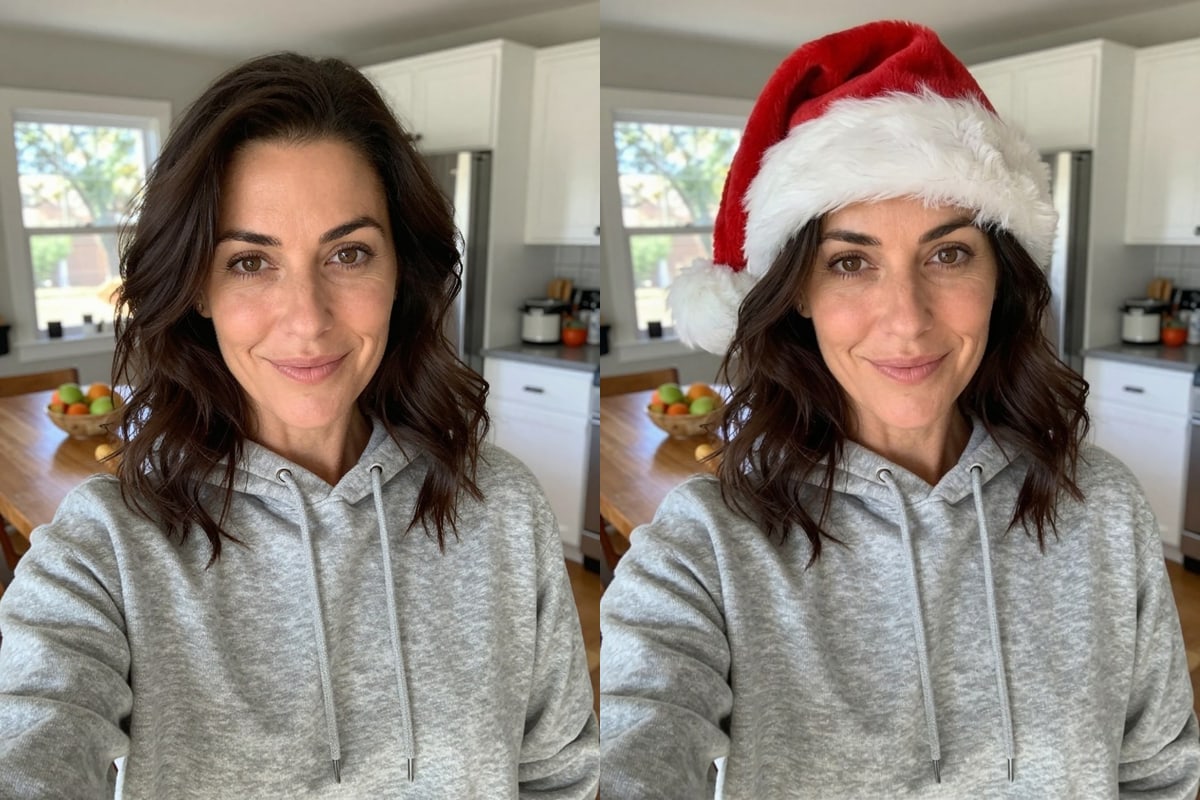
On a kitchen selfie of a woman in a grey hoodie, the hat came back sized to her head and resting on her hair. Her face, her hoodie and the kitchen behind her look the same as in the original. It is the simplest option and the best first thing to try on a profile picture.

PromptAdd a red Santa hat with white fur trim and a white pom-pom on every person and pet in the photo to this photo. Each one sits naturally: sized and angled to fit that head, resting on the hair and flattening it slightly where it touches, with a soft contact shadow, lit by the photo's own light and matching its sharpness and grain. Change nothing else: faces, expressions, hairstyles, bodies, clothes, the background, the framing and the colours all stay exactly as they are; do not retouch, restyle, crop or re-light the photo. If the picture is a drawing, logo, cartoon or avatar rather than a photo, draw the addition in the same style. No text, logos or watermarks.
  • Face and clothes unchanged
  • Good for a profile picture
A woman in a grey hoodie taking a selfie in a kitchen next to the same photo with a red Santa hat with white fur trim on her headOriginalNano Banana 2.1
Antlers

Reindeer antlers on a person and a dog

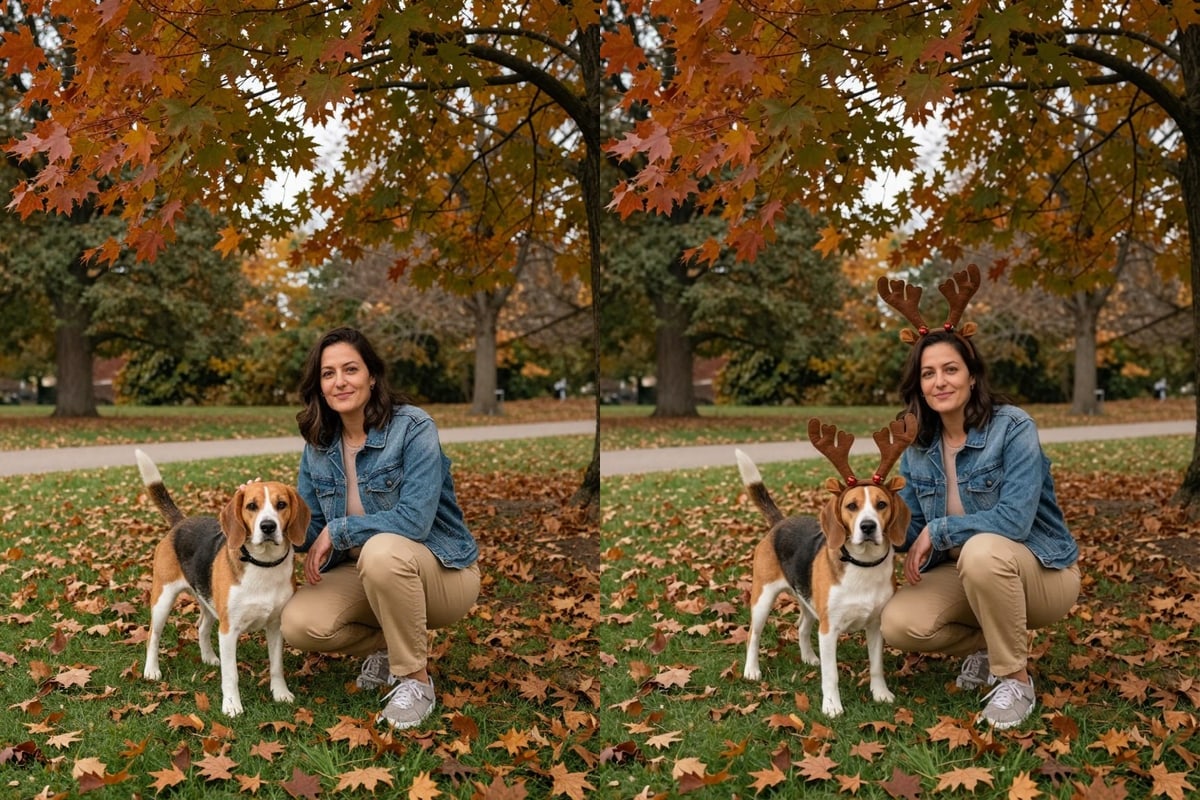
On a photo of a woman crouching on an autumn lawn with her beagle, both of them came back wearing brown antler headbands. The dog's markings, the woman's jacket and the fallen leaves are as they were. The option is written for every person and pet in the photo, so a pet gets one too.

PromptAdd a brown reindeer-antler headband with two small red bells on every person and pet in the photo to this photo. Each one sits naturally: sized and angled to fit that head, resting on the hair and flattening it slightly where it touches, with a soft contact shadow, lit by the photo's own light and matching its sharpness and grain. Change nothing else: faces, expressions, hairstyles, bodies, clothes, the background, the framing and the colours all stay exactly as they are; do not retouch, restyle, crop or re-light the photo. If the picture is a drawing, logo, cartoon or avatar rather than a photo, draw the addition in the same style. No text, logos or watermarks.
  • Pets get one too
  • Background kept
A woman crouching on an autumn lawn with a beagle next to the same photo with both of them wearing brown reindeer antler headbandsOriginalNano Banana 2.1
Elf hat

Green and red elf hats for a couple

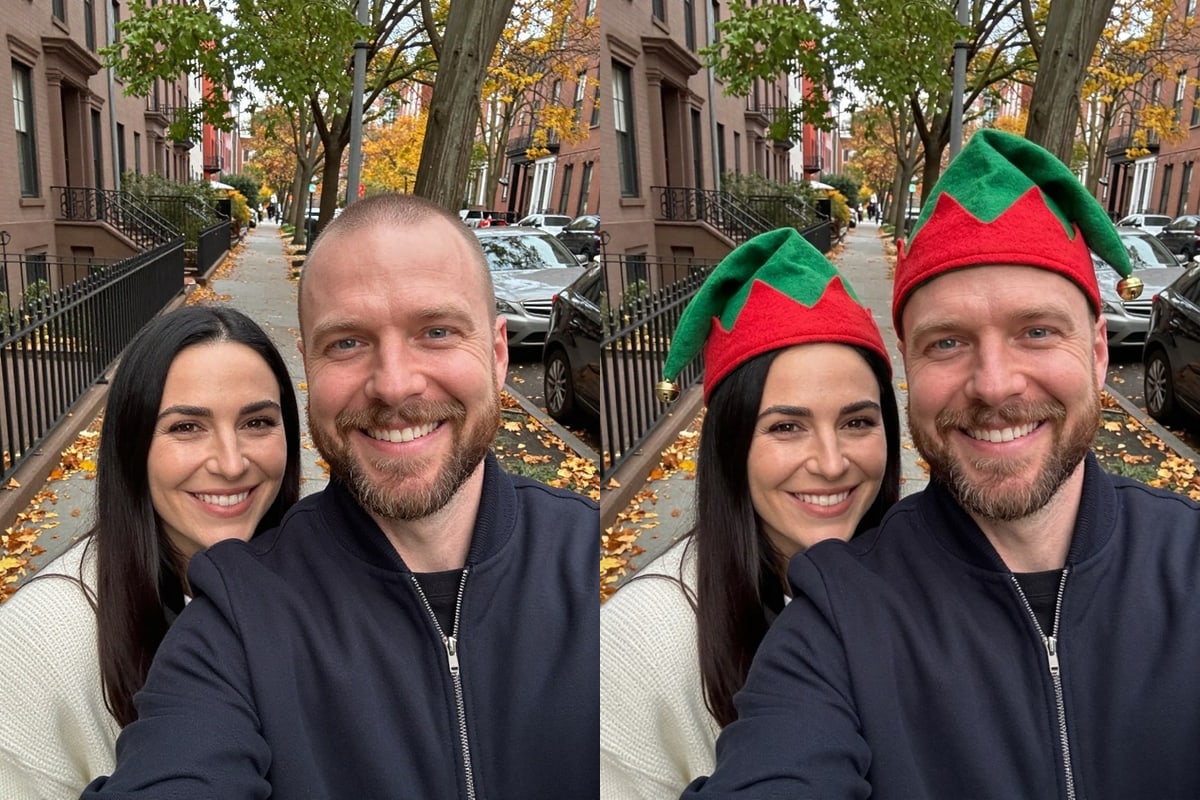
On a street selfie of a couple, each came back in a pointed green and red elf hat with a small bell on the tip. Both faces and the tree-lined street are the same. This option suits photos with two or more people, because everyone in the picture gets a hat.

PromptAdd a pointed green and red elf hat with a small gold bell on the tip on every person and pet in the photo to this photo. Each one sits naturally: sized and angled to fit that head, resting on the hair and flattening it slightly where it touches, with a soft contact shadow, lit by the photo's own light and matching its sharpness and grain. Change nothing else: faces, expressions, hairstyles, bodies, clothes, the background, the framing and the colours all stay exactly as they are; do not retouch, restyle, crop or re-light the photo. If the picture is a drawing, logo, cartoon or avatar rather than a photo, draw the addition in the same style. No text, logos or watermarks.
  • Every person gets a hat
  • Street background kept
A couple taking a selfie on a tree-lined city street next to the same photo with both of them wearing pointed green and red elf hatsOriginalNano Banana 2.1
Hat and scarf

A Santa hat and a red and white knitted scarf

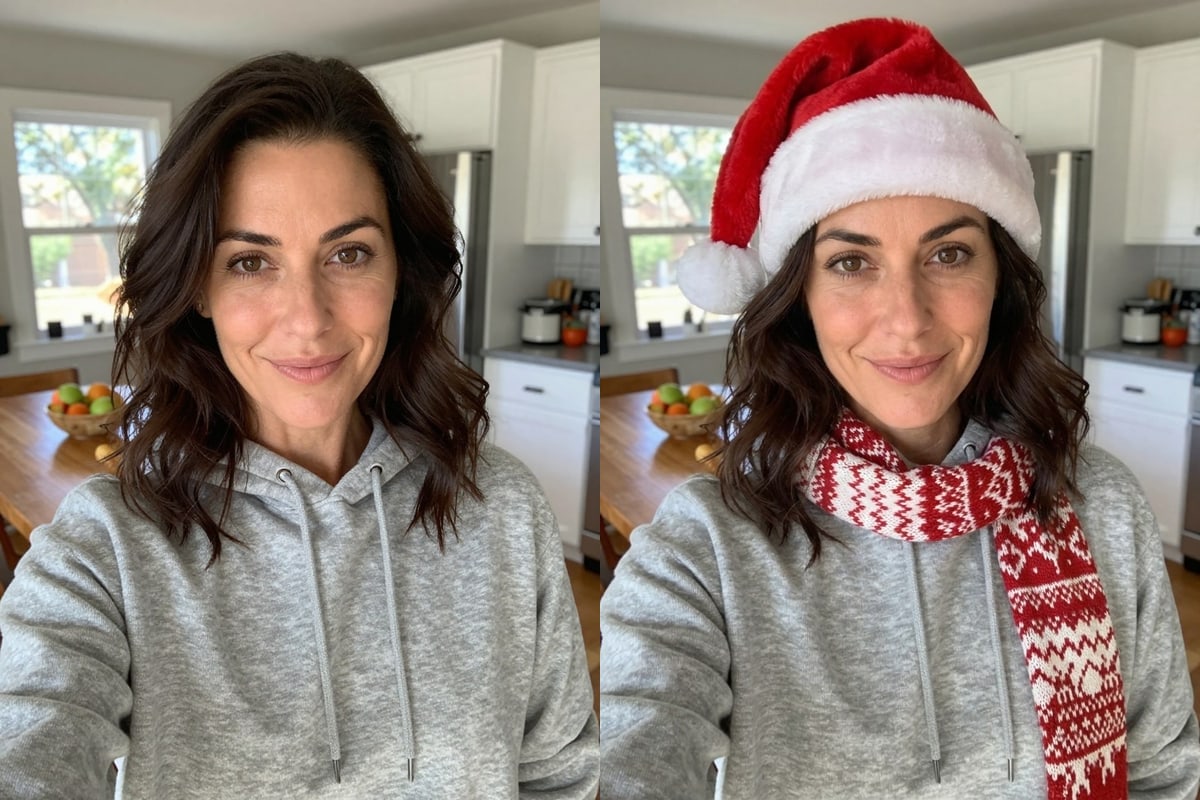
On the same kitchen selfie, this option added the Santa hat and a red and white knitted scarf that hangs over the front of the grey hoodie. It is the one that touches the most of the picture, because the scarf covers part of the clothes, so it needs a photo where the neck and shoulders are visible.

PromptAdd a red Santa hat and a red and white knitted scarf on every person and pet in the photo to this photo. Each one sits naturally: sized and angled to fit that head, resting on the hair and flattening it slightly where it touches, with a soft contact shadow, lit by the photo's own light and matching its sharpness and grain. Change nothing else: faces, expressions, hairstyles, bodies, clothes, the background, the framing and the colours all stay exactly as they are; do not retouch, restyle, crop or re-light the photo. If the picture is a drawing, logo, cartoon or avatar rather than a photo, draw the addition in the same style. No text, logos or watermarks.
  • Covers part of the clothes
  • Needs the neck and shoulders in view
A woman in a grey hoodie taking a selfie in a kitchen next to the same photo with a red Santa hat and a red and white knitted scarfOriginalNano Banana 2.1
Santa beard

A Santa hat and a fluffy white costume beard

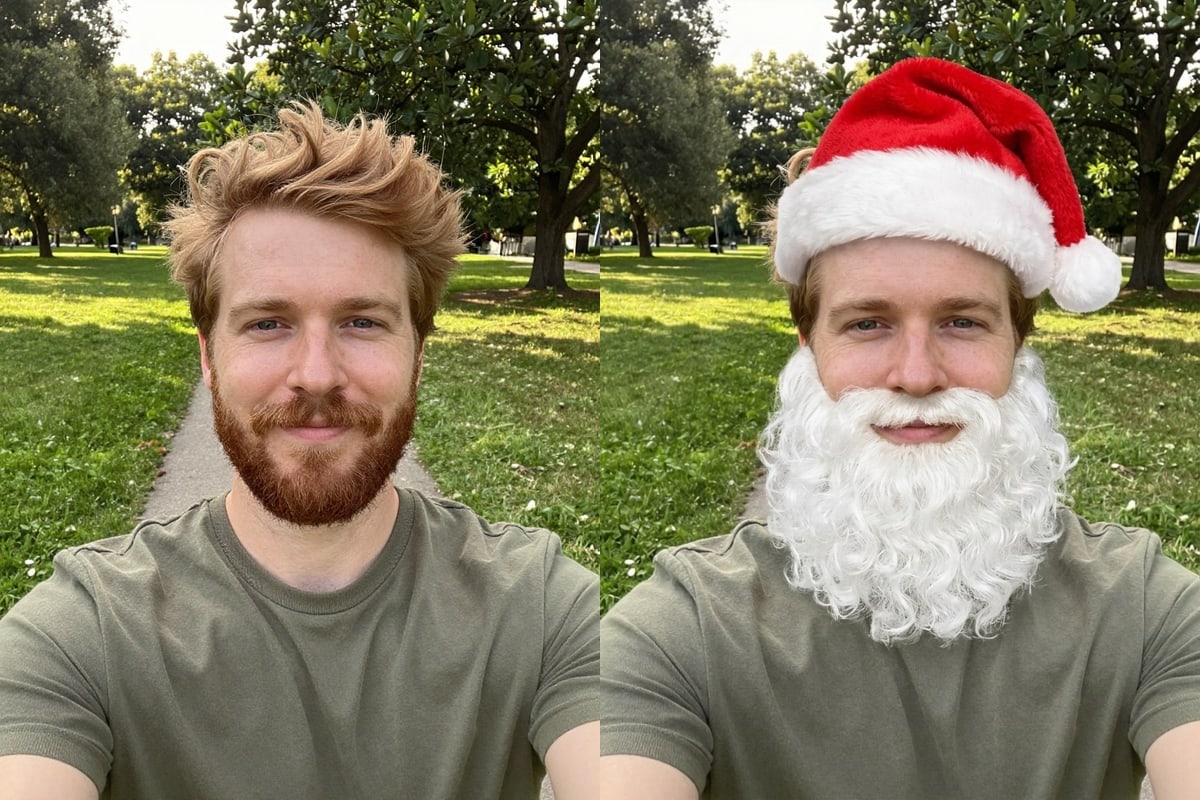
On a park selfie of a bearded man, the option added a Santa hat and a full white costume beard over his lower face. His eyes, his hair and the park are unchanged. It is written for people only, so a pet in the photo is left alone.

PromptAdd a red Santa hat and a fluffy white costume beard on every person in the photo (people only, not pets) to this photo. Each one sits naturally: sized and angled to fit that head, resting on the hair and flattening it slightly where it touches, with a soft contact shadow, lit by the photo's own light and matching its sharpness and grain. Change nothing else: faces, expressions, hairstyles, bodies, clothes, the background, the framing and the colours all stay exactly as they are; do not retouch, restyle, crop or re-light the photo. If the picture is a drawing, logo, cartoon or avatar rather than a photo, draw the addition in the same style. No text, logos or watermarks.
  • People only, not pets
  • Lower face is covered
A bearded man taking a selfie in a park next to the same photo with a red Santa hat and a fluffy white costume beardOriginalNano Banana 2.1

What a Christmas hat photo is good for

A hat is a small edit, so it fits a lot of small jobs.

Getting a good result

Start with a photo where the heads are fully in the frame with a little room above them. A hat needs space, and a head cut off at the top of the picture leaves nowhere for it to sit.

If you only want the hat, keep the instruction short. The sentence under the buttons shows exactly what will be sent and you can edit it, for example to ask for a green hat instead of a red one.

Check the result at full size. Each run gives a slightly different picture, and a run that fails costs nothing, so run it again if a hat sits oddly.

How to use it

Three steps, no install.

  1. Add one photo

    Upload a JPG, PNG or WebP of the person, the group or the pet. Photos are checked, then deleted about a day after you upload them.

  2. Choose a hat

    Pick Santa hat, Antlers, Elf hat, Hat & scarf or Santa beard. The line under the buttons shows what will be added, and you can change it.

  3. Download the result

    Press the button. About 30 seconds later the picture appears under the tool and stays in My images for 30 days.

AI Photo Editor pricing

A standard edit costs 5 credits; larger sizes and premium models cost 8 to 15. Buy a pack once and use it whenever you like. Bigger packs bring the price of a standard edit down from $0.17 to $0.12.

Starter

Try it out

$4.99one-time

30images

$0.17 per imageBase price

150 credits

Basic

Around 70 images

$9.99one-time

70images

$0.14 per imageSave 14%

350 credits

Plus

Around 150 images

$19.99one-time

150images

$0.13 per imageSave 20%

750 credits

Studio

For daily creators

$69.99one-time

600images

$0.12 per imageSave 30%

3,000 credits

Image counts and per-image prices here use 5 credits, what Nano Banana 2.1 costs at 1K. The cost of the model and size you pick always shows before you start.

Secure one-time checkout through Stripe. Buying a pack only adds credits to your account. USD prices. Review the final amount and any applicable tax at checkout before paying. Credits do not automatically renew, and unused credits can be refunded within 7 days of purchase. The credit cost shows before each image; finished results need no second payment to view or download.

Add Santa hat to photo questions

How do I add a Santa hat to a photo?

Upload the photo above, choose Santa hat and press the button. The hat is added to every person and pet in the picture, and the face, the clothes and the background are meant to stay as they were.

Can I put a Santa hat on my dog or cat?

Yes. The hat, antlers, elf hat and hat and scarf options are written for every person and pet in the photo. Our antlers example has a woman and her beagle, and both are wearing them.

Does it change anything except the hat?

It is told to change nothing else, and in our five examples the faces, clothes and backgrounds looked the same as the originals. The picture is redrawn each time, so compare your result with the original before you share it.

What is the difference between this and a sticker app?

A sticker sits on top of the photo at a size and angle you set by hand. Here the hat is drawn to fit the head, rests on the hair and takes the light of the photo, and you do not place anything yourself.

Can I add a hat to a group photo?

Yes. Everyone in the picture gets a hat, which is the point of the elf hat and Santa hat options. For large groups, look closely at each face and head after the run.

How much does it cost?

5 credits a photo on Nano Banana 2.1. New accounts get 5 free credits, enough for one photo. After that, credits come in one-time packs from $4.99, and a photo that fails costs nothing.

How long does it take?

Usually about half a minute. The result is saved in My images for 30 days if you leave the page.

Which photos can I upload?

One JPEG, PNG or WebP up to 20 MB, with the heads fully in the frame.

What happens to my photo?

Uploaded photos are checked, then deleted about a day after you upload them. The result stays in My images for 30 days, and you can download it at any time.

Is this an official tool from the model's maker?

AI Photo Editor is an independent site. It is not affiliated with, endorsed by or sponsored by the company that makes the model; model names belong to their owners.

More tools

One account and one set of credits for every tool and model.

Add a Santa hat to my photo now

Upload your own selfie, group photo or pet and choose a hat.

5 credits a photo. Failed generations are refunded.
No photo? Try one:

This sentence is what we send. Edit it if you like.

This tool edits a photo: add one above first.