Christmas card from photo

Upload a family, couple or pet photo, pick a style and type your greeting to get a finished 3:4 Christmas card.

5 credits a card. Failed generations are refunded.
No photo? Try one:

This sentence is what we send. Edit it if you like.

Add 1 to 5 photos above first.

Ratio3:4

How each card style turned out

One run per style on a photo that suits it, made with the words the tool sends. We say what came back, including what did not.

Classic

A red card with holly corners and gold lettering

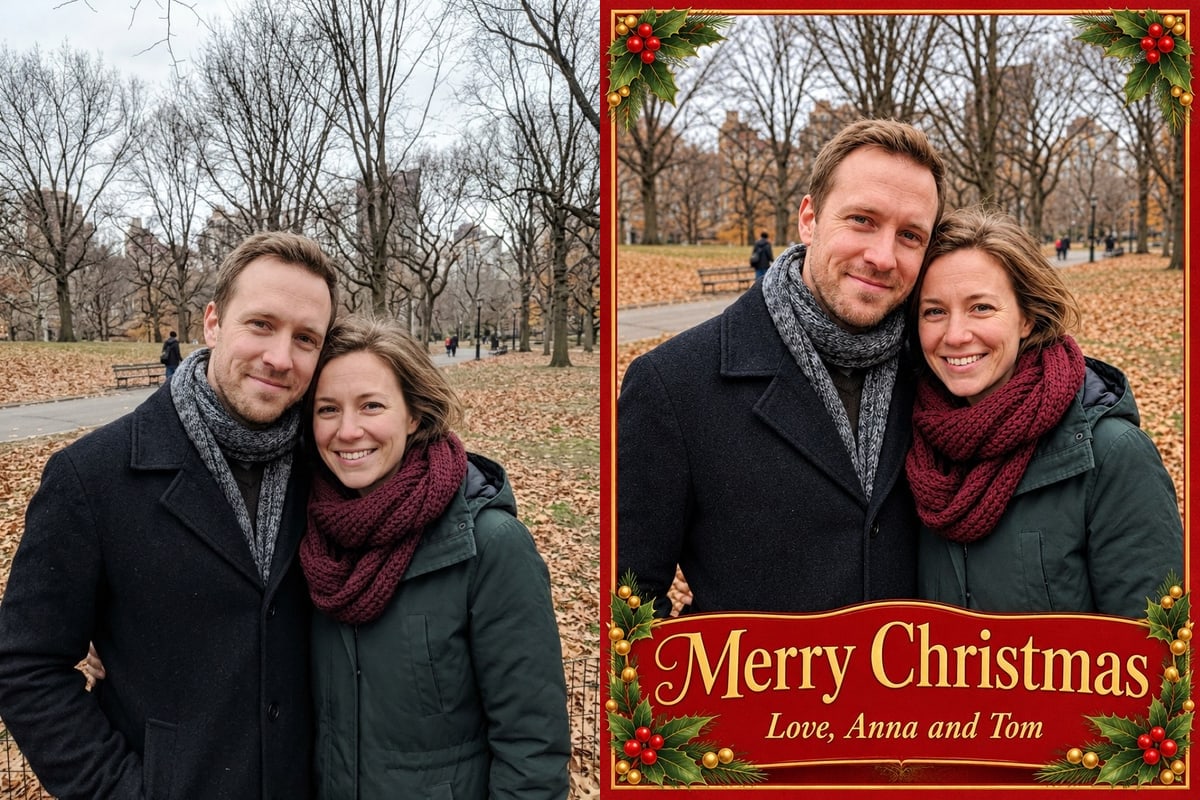
From a couple standing on a park path, Classic set the photo inside a deep red card with holly in the corners and a gold banner across the bottom. "Merry Christmas" and, smaller below it, "Love, Anna and Tom" are spelled as typed. The couple's faces, coats and the park behind them are the same as in the original.

PromptDesign a finished Christmas card from this photo: a classic red and gold Christmas card with holly in the corners and a thin gold border. The photo is the main picture on the card and is shown large. The people stay exactly as photographed: the same faces, hair, ages, expressions and clothes, with no one added or removed; do not turn them into an illustration. Print the greeting "Merry Christmas" exactly as written, letter for letter, once, in large clear lettering that does not cover any face, and "Love, Anna and Tom" smaller below it. Print no other words, dates or small print. The card fills the whole image edge to edge, flat and front-on like a file sent to a print shop: no mockup, envelope, hands or table.
  • Greeting and names spelled correctly
  • 880 x 1168 PNG
A smiling couple in winter coats on a park path next to a red Christmas card with holly in the corners showing their photo above the gold lettering Merry Christmas, Love, Anna and TomOriginalGPT Image 2.6 Flare
Watercolour

Painted snowflakes and pine branches

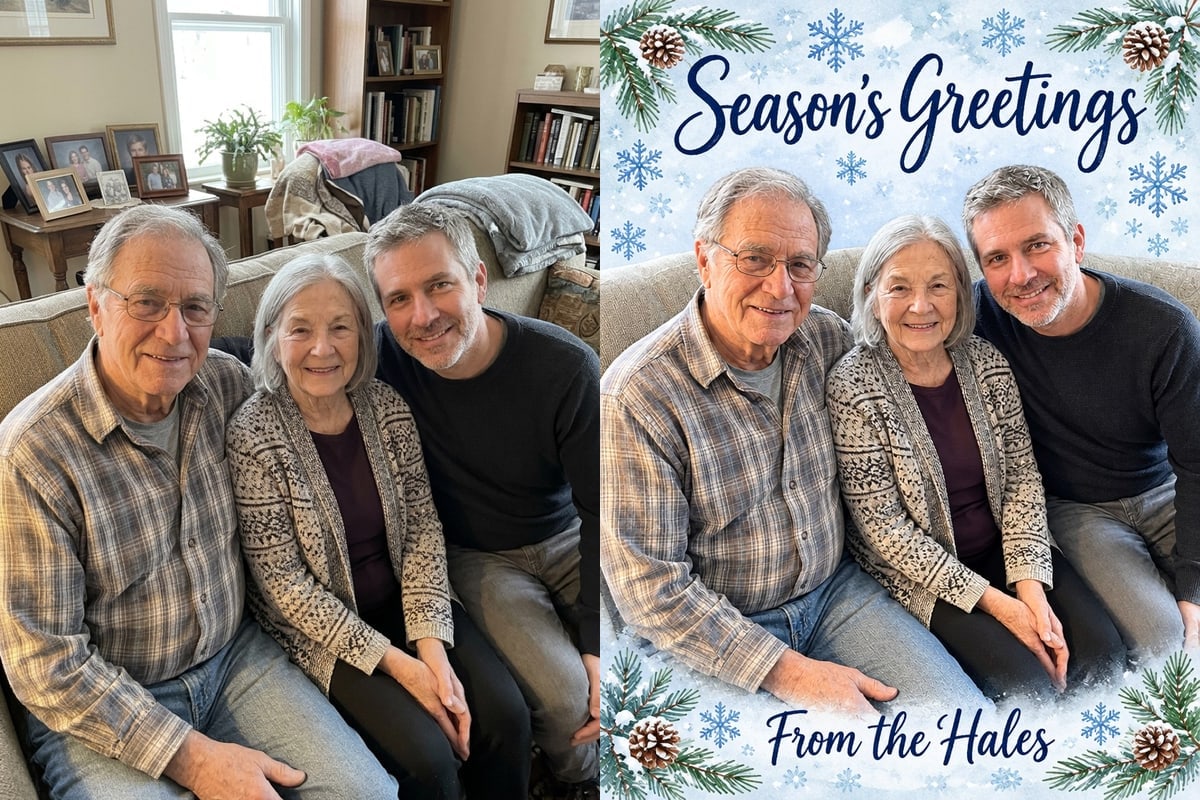
From a snapshot of three people on a sofa, Watercolour surrounded the photo with painted pine branches and snowflakes, with "Season's Greetings" in blue script above and "From the Hales" below. The photo itself is given a soft painted finish, so the faces are recognisable but less crisp than in the original.

PromptDesign a finished Christmas card from this photo: a soft winter card with painted watercolour snowflakes and pine branches on a pale blue wash, the greeting in navy hand lettering. The photo is the main picture on the card and is shown large. The people stay exactly as photographed: the same faces, hair, ages, expressions and clothes, with no one added or removed; do not turn them into an illustration. Print the greeting "Season's Greetings" exactly as written, letter for letter, once, in large clear lettering that does not cover any face, and "From the Hales" smaller below it. Print no other words, dates or small print. The card fills the whole image edge to edge, flat and front-on like a file sent to a print shop: no mockup, envelope, hands or table.
  • Photo gets a painted finish
  • Both lines spelled correctly
Three family members seated on a sofa next to a watercolour Christmas card that frames them with painted snowflakes and pine branches under Season's Greetings, with From the Hales belowOriginalGPT Image 2.6 Flare
Minimal

A white card with plain lettering

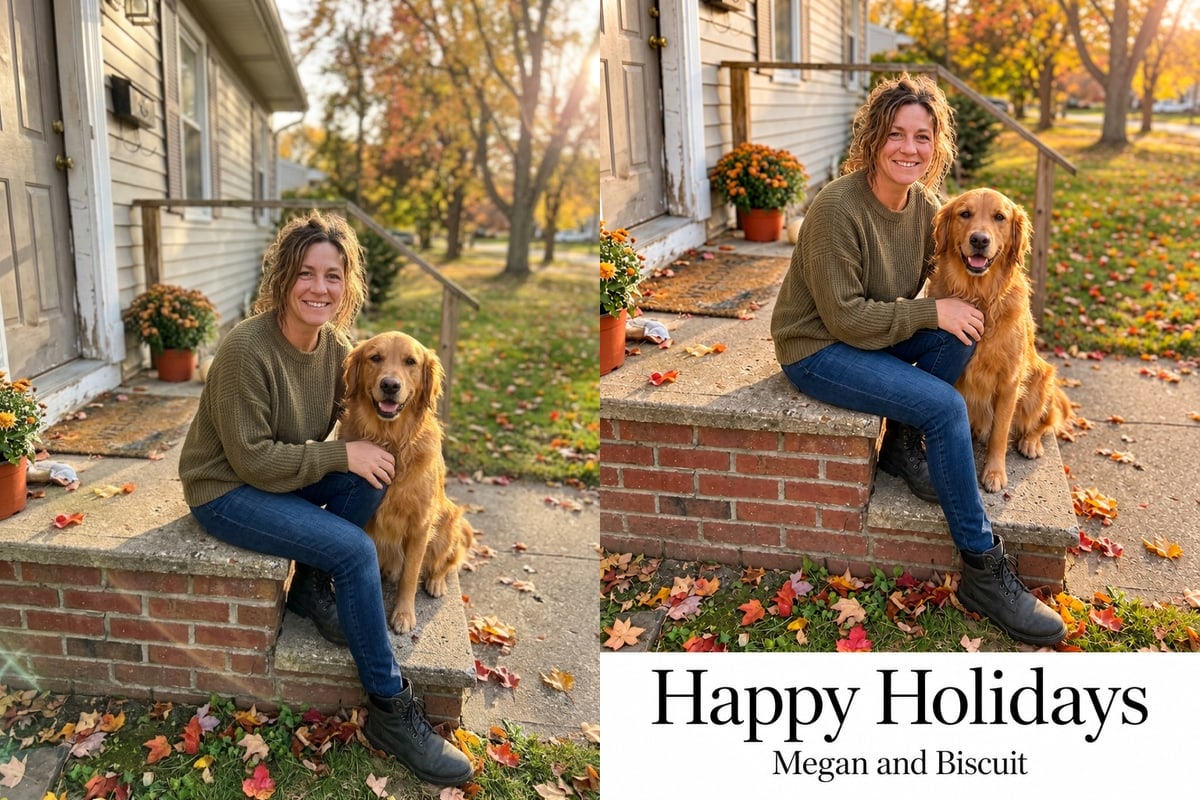
From a woman and her golden retriever on a doorstep, Minimal kept the photo untouched and placed it above a wide white margin with "Happy Holidays" in a large serif and "Megan and Biscuit" in a small line below. The style asks for one small evergreen sprig, and none appeared in this run.

PromptDesign a finished Christmas card from this photo: a modern minimal card: the photo full-bleed with a clean white band at the bottom and elegant black serif lettering. The photo is the main picture on the card and is shown large. The people stay exactly as photographed: the same faces, hair, ages, expressions and clothes, with no one added or removed; do not turn them into an illustration. Print the greeting "Happy Holidays" exactly as written, letter for letter, once, in large clear lettering that does not cover any face, and "Megan and Biscuit" smaller below it. Print no other words, dates or small print. The card fills the whole image edge to edge, flat and front-on like a file sent to a print shop: no mockup, envelope, hands or table.
  • Photo kept as it was
  • No sprig in our run
A woman sitting on a doorstep with her golden retriever next to a modern white Christmas card showing the photo above the words Happy Holidays and Megan and BiscuitOriginalGPT Image 2.6 Flare
Vintage

A faded 1950s postcard with a deckled edge

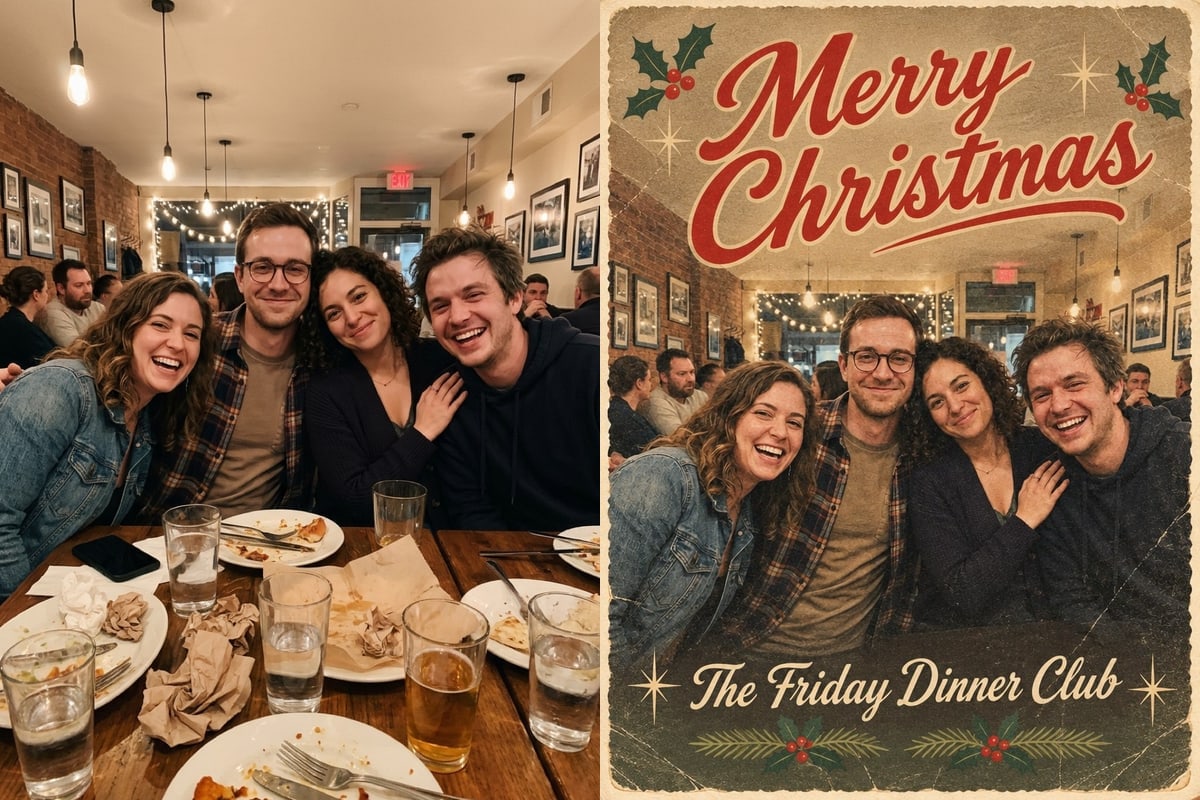
From four friends round a restaurant table, Vintage made a warm, muted postcard with a deckled edge, holly sprigs, a red script "Merry Christmas" across the top and "The Friday Dinner Club" along the bottom. All four faces are kept and the table scene is the same.

PromptDesign a finished Christmas card from this photo: a 1950s Christmas postcard with a deckled edge, muted colours and retro script lettering. The photo is the main picture on the card and is shown large. The people stay exactly as photographed: the same faces, hair, ages, expressions and clothes, with no one added or removed; do not turn them into an illustration. Print the greeting "Merry Christmas" exactly as written, letter for letter, once, in large clear lettering that does not cover any face, and "The Friday Dinner Club" smaller below it. Print no other words, dates or small print. The card fills the whole image edge to edge, flat and front-on like a file sent to a print shop: no mockup, envelope, hands or table.
  • Deckled postcard edge
  • Both lines spelled correctly
Four friends at a restaurant table next to a vintage Christmas postcard with a deckled edge showing the photo under red script Merry Christmas and The Friday Dinner ClubOriginalGPT Image 2.6 Flare

Six styles and twelve greetings to start from

The tool has six card styles: Classic, Watercolour, Minimal, Vintage, Candy stripe and Kraft & plaid. We show results for the first four above. The other two use the same method of framing your photo inside a designed card.

The greeting box has twelve quick picks, each within the 40 characters the box allows: Merry Christmas, Season's Greetings, Happy Holidays, Merry Christmas from the family, Peace and Joy, Merry and Bright, With Love This Christmas, Yule Love It, Merry Woofmas, Meowy Christmas, Happy New Year and Cheers to 2027. Pick one and edit it, or write your own, and add a family name or a signature in the second box.

Before you send or print your card

The words on the card are drawn by the image model, not typed by a layout program, so two checks are worth making.

How to use it

Three steps, no install.

  1. Add one photo

    Upload a JPG, PNG or WebP of the person or the pet. Photos are checked, then deleted about a day after you upload them.

  2. Pick a style, greeting and names

    Choose one of the six styles, then pick a greeting or write your own and add a family name or signature (up to 40 characters each).

  3. Download the result

    Press the button. About 30 seconds later the picture appears under the tool and stays in My images for 30 days.

AI Photo Editor pricing

A standard edit costs 5 credits; larger sizes and premium models cost 8 to 15. Buy a pack once and use it whenever you like. Bigger packs bring the price of a standard edit down from $0.17 to $0.12.

Starter

Try it out

$4.99one-time

30images

$0.17 per imageBase price

150 credits

Basic

Around 70 images

$9.99one-time

70images

$0.14 per imageSave 14%

350 credits

Plus

Around 150 images

$19.99one-time

150images

$0.13 per imageSave 20%

750 credits

Studio

For daily creators

$69.99one-time

600images

$0.12 per imageSave 30%

3,000 credits

Image counts and per-image prices here use 5 credits, what GPT Image 2.6 Flare costs at 1K 3:4. The cost of the model and size you pick always shows before you start.

Secure one-time checkout through Stripe. Buying a pack only adds credits to your account. USD prices. Review the final amount and any applicable tax at checkout before paying. Credits do not automatically renew, and unused credits can be refunded within 7 days of purchase. The credit cost shows before each image; finished results need no second payment to view or download.

Christmas card from photo questions

How do I make a Christmas card from a photo?

Upload the photo above, choose a card style, pick or type a greeting, add a family name or signature if you like, and generate. The card comes back as a 3:4 image you can download and share.

Does the site mail physical Christmas cards?

No. You get a digital image, 880 by 1168 pixels, to send by message or email or to print yourself at a home printer or a print shop.

How reliable is the text on the card?

In our four examples the greeting and the names came back spelled as typed. The words are still drawn by an image model, so check every letter before you print or send, and keep both lines within 40 characters.

What size can I print it?

Up to about 5 x 7 inches looks acceptable; 4 x 6 inches reaches about 220 pixels per inch. At 8 x 10 inches the image is too soft, so enlarge it first.

Can I use a photo of my pet?

Yes. Our Minimal example is a woman with her golden retriever, and the greeting list includes Merry Woofmas and Meowy Christmas.

Can I put several photos on one card?

The tool takes up to five photos for a card with more than one picture. We have not tested that on a card, so look closely at the faces after each run.

How much does it cost?

5 credits a card on GPT Image 2.6 Flare at 1K 3:4. New accounts get 5 free credits, enough for one card. After that, credits come in one-time packs from $4.99, and a card that fails costs nothing.

Can I edit the photo into a Christmas scene first?

Yes. Make the picture in the Christmas photo maker or the Add Santa to photo tool, download it or open it from My images, and load it here to frame it as a card.

Which photos can I upload?

A clear JPEG, PNG or WebP up to 20 MB. Photos of people from the waist up fit the card frame best.

Is this an official card maker from OpenAI?

AI Photo Editor is an independent site. It is not affiliated with, endorsed by or sponsored by the company that makes the model; model names belong to their owners.

More tools

One account and one set of credits for every tool and model.

Make your Christmas card from a photo

Upload a family, couple or pet photo below, pick a style and type your greeting.

5 credits a card. Failed generations are refunded.
No photo? Try one:

This sentence is what we send. Edit it if you like.

Add 1 to 5 photos above first.

Ratio3:4